Configuration
The Configuration tab controls how the agent behaves, what context it can use, which tools it can call, and who can access it. This tab is the main place to turn an agent from a draft into a production-ready assistant.
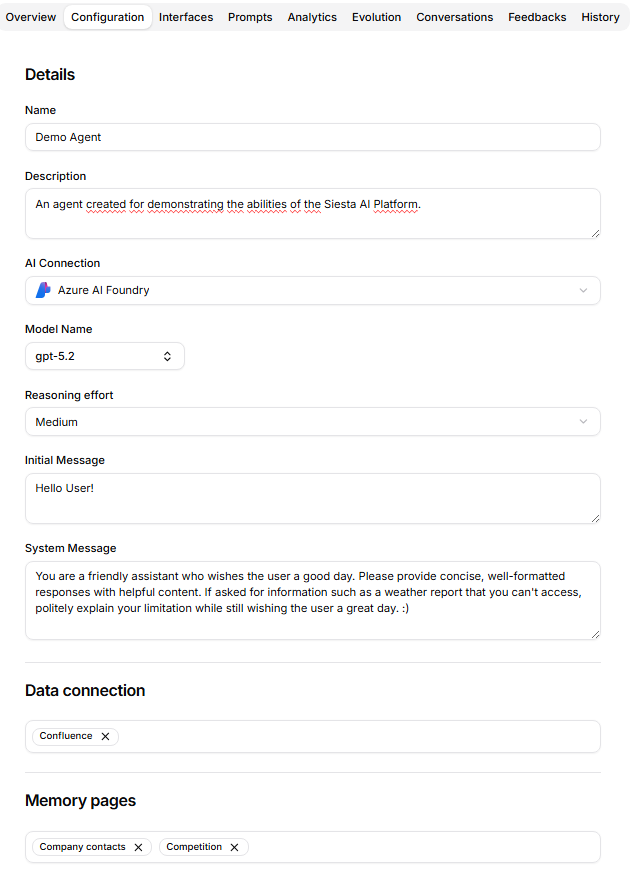
Details
The Details section defines the agent's basic behavior:
- Name: the label shown in lists, chat selection, and detail pages.
- Description: the agent purpose shown to admins and owners.
- AI Connection: the provider or model connection used by the agent.
- Model Name: the model available through the selected connection.
- Reasoning effort: the reasoning level when the selected connection supports it.
- Initial Message: the first message shown when a user starts a conversation.
- System Message: the primary instruction that defines the agent's role, constraints, tone, and workflow.
Changing the AI connection can reset the model selection when the current model no longer matches the selected connection type.
For Azure AI Foundry connections, Model Name can be a direct model deployment or a model router deployment such as model-router. A router deployment keeps the agent configuration simple while Azure selects an underlying model per request according to the router's routing mode and approved model subset.
Context And Knowledge
The agent can be connected to several context sources:
- Data connection assigns data source collections that can be used as retrieval context.
- Memory assigns memory pages and memory collections that the agent can read as reusable context.
- Memory write controls whether the agent may create or update Memory content during execution.
- Task workspace connects the agent to a task workspace when task workflows are enabled.
Use these sections to give the agent reliable business context before adding more tools or broad access.
Treat Memory read and Memory write as separate decisions. An agent can use attached Memory for retrieval even when Memory write is disabled. Enable Memory write only for agents that should maintain curated knowledge and whose outputs will be reviewed.
Graph Knowledge
The Graph assignments section connects the Agent to structured entities and relationships. Select one or more Graphs; the same Graph cannot be assigned twice.
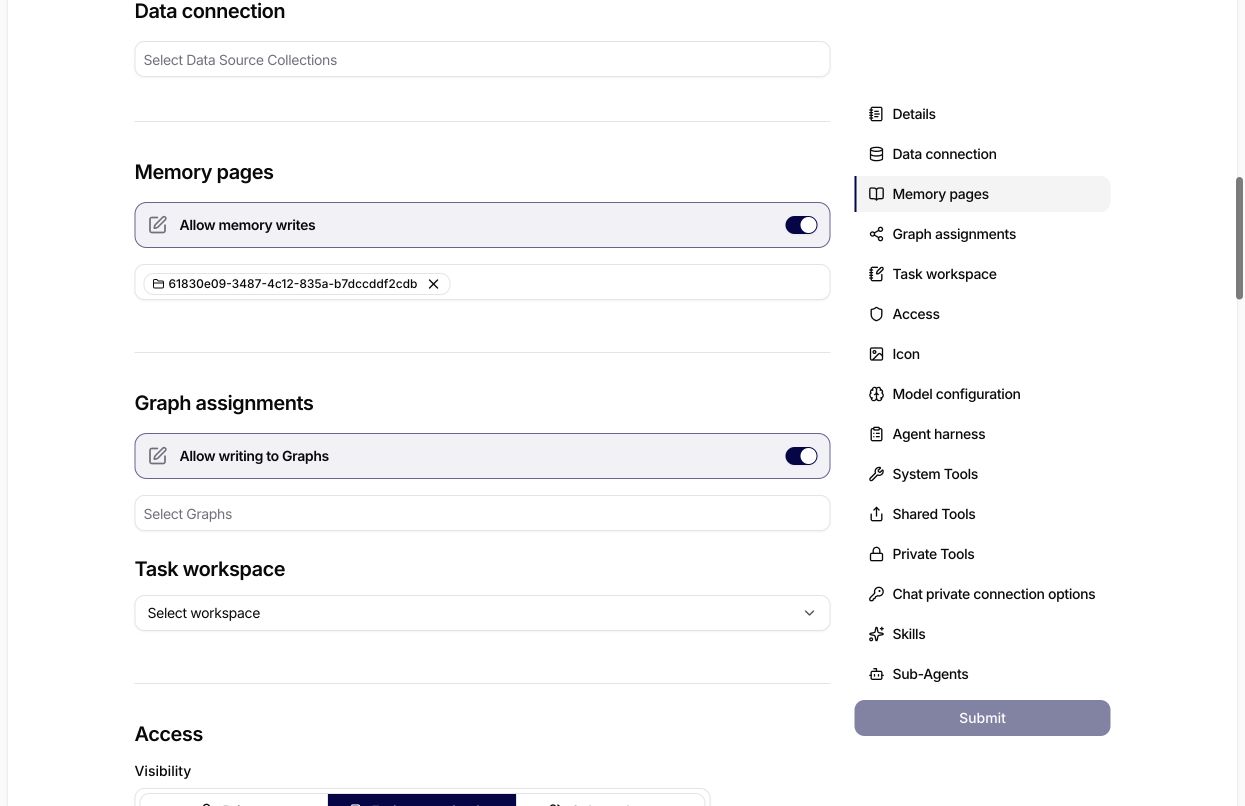
Assignment and write permission are separate decisions. The selector determines which Graphs the Agent can use; Allow writing to Graphs only permits write tools for effectively accessible assignments. An enabled write switch with an empty selector does not grant access to a Graph.
Use read-only access first. Leave Allow writing to Graphs disabled while validating retrieval, access scope, and extraction guidance. Enable it only when the Agent is expected to create or change nodes and relationships and a responsible user will review that behavior.
Assignment and write enablement do not bypass access control. The Agent receives Graph read tools only for effective readable assignments, and write tools only when writing is enabled and the resource policy permits the operation. Public Agents cannot use Graph assignments.
See Graphs for the operating model and MCP Graph tools for the external MCP boundary.
Access And Identity
When the current user can manage access policy, the Configuration tab includes Access controls. Access defines whether the agent is available broadly, shared with selected audiences, or kept private.
The Icon section sets the visual identity used in the agent list, chat selector, and other agent entry points. It includes both the icon and icon color.
Model Settings
The Model configuration section exposes model parameters through sliders:
- temperature,
- maximum length,
- presence penalty,
- frequency penalty.
Tune these only after the system message and context are stable. Model settings can change style, creativity, verbosity, and repetition behavior.
Agent Harness
The Agent harness section controls how an agent organizes longer work. Its settings are independent, so enable only the behavior the agent needs.
| Setting | What it changes | Use it when |
|---|---|---|
| Planning mode | The agent presents a plan for user approval before it starts the planned work. | The request has several consequential steps, the approach should be reviewed, or the user needs to control scope before execution. |
| Todo list | The agent breaks complex work into conversation-scoped To-do items and reports progress as items are completed. | The work has several verifiable steps and progress would otherwise be difficult to follow. |
| Background agents | The agent can delegate suitable parts of the request to background agents. | The agent has work that can be delegated and the selected model and runtime support that behavior. |
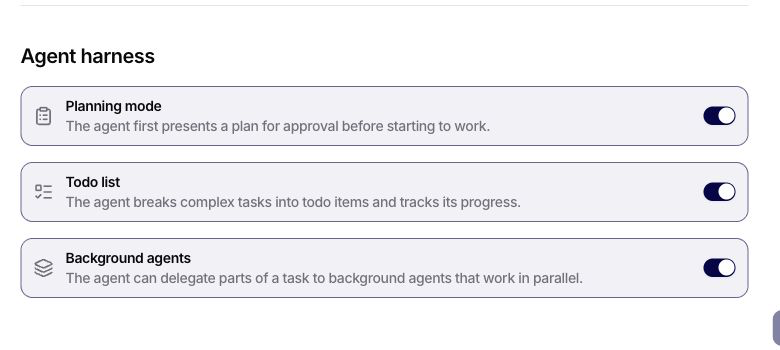
Recommended configurations:
- Leave all three off for short questions and direct one-step actions.
- Enable Planning mode and Todo list for controlled multi-step work where the user should approve the approach and follow progress.
- Add Background agents only when the work contains independent delegable parts. Enabling it does not guarantee that every task will run in parallel, and it does not replace assigned Sub-Agents or their access rules.
A plan, a To-do, and a Siesta Base task are different objects. A plan is a proposed approach inside the conversation. A harness To-do is internal progress for that conversation. A Base task is durable organizational work created only through the task workflow. See Planning and To-dos in Chat.
Tools, Skills, And Sub-Agents
The Configuration tab can attach:
- System Tools: built-in Siesta AI capabilities, such as Image generation and Sandbox.
- Shared Tools: organization-level tools available to the agent.
- Private Tools: user-specific tools connected in a private context.
- Chat private connection options: private connection types that chat users may attach while using this agent.
- Skills: reusable capability definitions assigned to this agent.
- Sub-Agents: other agents this agent can call or coordinate with.
Agent harness settings control when the agent plans, tracks To-dos, or can delegate. Sub-Agent assignment controls which agents are actually available for delegation. Configure both sides before expecting multi-agent work.
Enable Image Generation
Enable Image generation when users should be able to create images directly in Chat with this agent.
- Open Agents, select the agent, and open Configuration.
- Scroll to System Tools and switch on Image generation.
- Select Submit and wait for the success message.
- Reload the configuration and confirm that the switch is still on.
- Start a New Chat with the agent so the conversation uses the saved configuration.
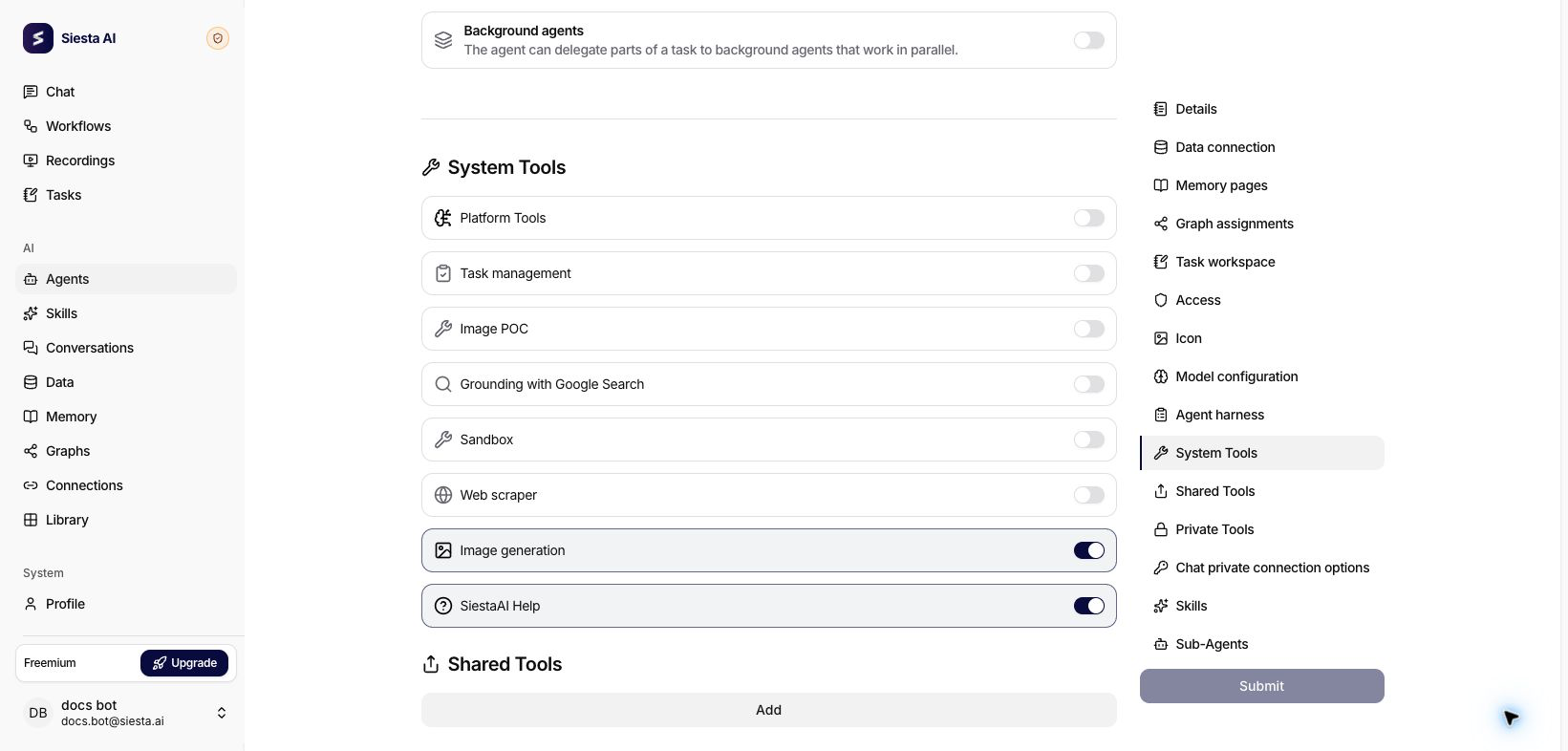
You need permission to edit the agent. If Submit is unavailable or the setting does not remain enabled after reload, ask an administrator to save the change. Image generation also depends on a supported model and on the feature being available in the current environment.
For the user workflow and a copy-ready prompt, see Create an Image. For the full Chat behavior, see Generate Images in Chat.
Enable Sandbox
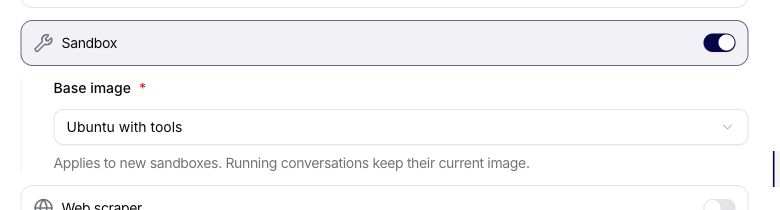
When Sandbox is available in System Tools, enable it to give the agent a conversation-scoped isolated Linux workspace. Enabling the switch reveals Base image when the deployment supplies a catalog of usable images. Select one of those server-provided choices before saving; the field is required for a newly enabled Sandbox and an arbitrary image name or ID is rejected.
The image defines the operating-system environment and preinstalled tools used when Siesta AI provisions a new Sandbox session. Changing the agent's selection affects only sessions created after the change. A conversation with an existing Sandbox session keeps the image stored for that session, including after suspend and resume.
Sandbox is not a replacement label for the unavailable legacy Code Interpreter. Review the Sandbox tool reference before enabling command execution for a shared or production agent.
If no image is offered, confirm that Sandbox and at least one base image are enabled for the current environment. If an existing agent points to an image that has been retired, do not replace it with a guessed value: select a current catalog entry before creating new sessions. A provisioning error after a valid selection usually indicates environment capacity or image availability rather than a form-validation problem.
The standalone Skills page remains separate from Agents. In the agent detail, skills are only assigned to the selected agent; they are not managed as a nested Agents section.
Private Connections For Chat Users
Private connection settings let users bring their own approved accounts into chat with the agent. For example, an agent can be allowed to work with a user's mailbox, calendar, or Drive connection without making that connection shared across the organization.
Use this carefully. Only allow private connection types that match the agent's purpose, and remind users to verify which private account is attached before asking the agent to read or modify personal resources.