Conversations
The Conversation feature serves to provide a clear display of the history of interactions between users and individual AI agents within the Siesta AI platform.
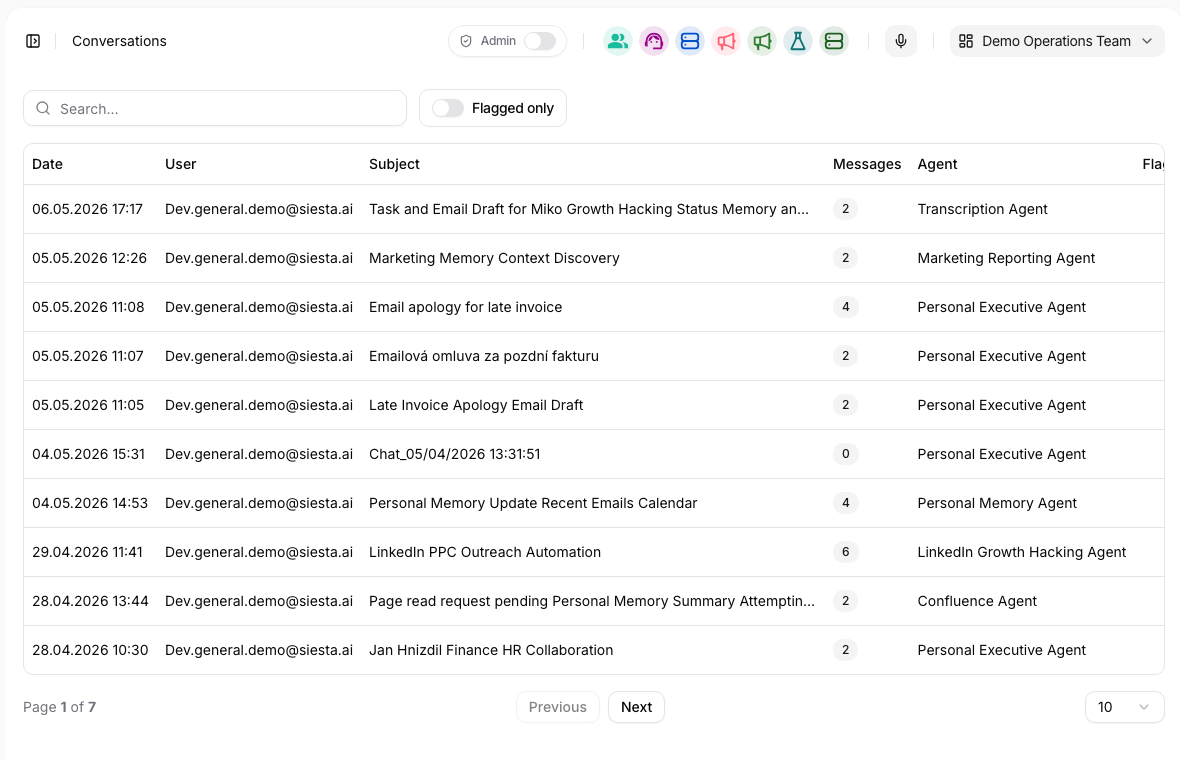
Feature Description
Overview of All Conversations
An administrator or authorized user can see a list of all previously conducted conversations sorted by date. The displayed information in the overview includes:
- Date and time of the conversation start
- User's email
- Subject / topic of the conversation (e.g., “Specified deadline for termination of employment")
- Number of messages in the conversation
- Name of the agent with whom the communication took place (e.g., “HR Agent”)
Use filtering and search to narrow the list by user, agent, date, or conversation context when investigating a specific issue.
Administrators can also enable Flagged only to focus on conversations marked by safety or moderation checks. When the flagged-reason column is available, the row shows a flagged badge; open it to review the stored reason before deciding whether the issue belongs in agent configuration, safety settings, or user follow-up.
Conversation Detail
Clicking on a row opens the conversation detail at /internal/conversations/[id].
The detail shows the full message history, including user inputs, assistant responses, and any visible execution context. Use this view when you need to understand exactly what the user asked, how the agent responded, and whether the answer relied on tools, uploaded files, or prior context.
When reviewing a conversation detail, check:
- the first user request and the agent selected for the conversation,
- follow-up messages that changed the context,
- files or images attached by the user,
- response formatting and cited information,
- errors, missing answers, or interrupted generation,
- whether the user submitted feedback on a response.
Long internal conversation details can show the same transcript outline as chat once the thread contains at least five user turns. Use it to jump between user requests while reviewing the surrounding answers and tool activity. The full behavior, keyboard controls, and surface-availability matrix are documented under Navigate a Long Conversation.
Feedback Option
Individual responses can be rated positively (thumbs up) or negatively (thumbs down), and a comment can be added. This information is subsequently displayed in the Feedback section and helps fine-tune the accuracy of responses.
Feedback from a conversation is useful for:
- identifying weak answers,
- improving agent prompts,
- checking whether the right data collection was attached,
- deciding whether an issue belongs in agent evolution work.
Sharing
If sharing is enabled by organization security settings, a conversation can be shared through a link. Sharing is useful for support, review, or handoff, but it should be used carefully when the conversation contains sensitive data.
Before sharing:
- confirm that public conversation sharing is allowed,
- remove or avoid sharing conversations with confidential information,
- share only with the intended audience,
- use Audit Log if you need to verify sharing-related changes.
Artifacts
Agent responses can include artifacts: generated files or structured outputs attached to a specific assistant message. Artifacts are different from user-uploaded attachments and from documents stored in Data collections. They are outputs produced during a conversation and remain connected to the message that created them.
Artifacts can be opened or downloaded from the conversation detail when the viewer has access to the conversation. If a conversation is shared, artifact visibility follows the same sharing and security model as the conversation itself. If public sharing is disabled by tenant policy, users should not rely on shared artifact links for external handoff.
An artifact records the published file name, size, and content type used by the download experience. Sandbox workspace files become artifacts only after the agent calls publishFiles; writing a file under /mnt/work does not attach it to a message. Publishing a changed path again creates another message artifact, so reviewers can distinguish downloads instead of assuming an earlier artifact was overwritten.
For the full input, workspace, and publishing lifecycle, see Sandbox.
Use artifacts for outputs such as generated reports, files, exports, or other downloadable results. For long-term source knowledge, use Data instead.
Documents Used by Search
In an authenticated internal conversation detail, document badges below an assistant answer identify Data collection documents returned by search actions. The corresponding action detail lists all references and links each one to its document detail in a new tab. Use this evidence together with the search result and answer text; a displayed document is retrieved context, not automatic proof for every statement.
The reference remains part of streamed, realtime, and saved conversation data, but it does not copy the document or its permission into the conversation. Opening it still requires access to the collection, source, and document. A deleted, moved, or inaccessible target can therefore return an unavailable or unauthorized state. Shared/public conversation views do not expose the internal Data links.
Document references differ from user attachments and assistant artifacts. Attachments are user-provided inputs; artifacts are produced or explicitly published outputs; document references are structured pointers created by Data search. The complete badge, overflow, icon, and access behavior is documented in Documents Used in an Answer.
Realtime Context
Realtime and voice sessions are stored as part of the same conversation model. A realtime session is not a separate object that replaces conversation history; it is a temporary transport for interacting with an agent while preserving the conversation thread.
When reviewing a realtime conversation, check the same operational signals as standard chat: selected agent, user context, transcript/messages, tool executions, approvals, feedback, and any artifacts generated during the session.
Audit and Tool Activity
Conversation review often connects to Logs:
- Use Tool Executions to inspect tool calls created by the conversation.
- Use Audit log to check administrative changes that may have affected access, sharing, or agent behavior.
Access Rights
Access to these records is governed by user roles. While regular users do not have access to the feature, administrators and the management team can view the complete history of all conversations.