Tools
A tool gives an agent a capability beyond writing a model response. It can read live information, work with another application, execute code, create a file, or operate Siesta AI itself.
Siesta AI exposes two user-facing groups:
Tools
├── Connection Tools
│   ├── Shared Tools
│   └── Private Tools
└── System Tools
    ├── Search, scraping, code, tasks, and orchestration
    └── Platform Tools for Siesta AI administration
Choose the Right Tool
| The agent needs to | Use | Example |
|---|---|---|
| Read or change an external business application | Connection Tool | Gmail, Slack, Jira, HubSpot, Google Drive |
| Use a team or organization credential | Shared Tool | Shared support mailbox or service-account Jira |
| Act as the current user | Private Tool | Personal Gmail, calendar, or OneDrive |
| Use a capability provided by Siesta AI | System Tool | Image generation, Task Management, Web Scraper |
| Create or update Siesta AI configuration | Platform Tools | Create an agent, update a Skill, write a Memory page |
| Answer from maintained indexed knowledge | Data or Memory | Policies, manuals, approved knowledge collections |
| Call a custom interface | REST or MCP Connection Tool | Internal CRM API or MCP server |
Connection Tools
Connection Tools work with external systems. Their functions come from configured Connections, REST APIs, or MCP servers. Examples include reading a Drive file, sending a Slack message, creating a Jira issue, or querying an analytics service.
- Shared Tools use Connections shared with the agent's audience and are suitable for team-owned or organization-owned accounts.
- Private Tools resolve the current conversation user's own Connection and are suitable when actions must run under that user's identity.
The difference is credential ownership and runtime identity, not the provider function itself. Connection functions can be disabled, enabled, or enabled with confirmation. Require confirmation for send, publish, create, update, delete, permission, financial, or production-impacting actions.
System Tools
System Tools are built-in capabilities assigned directly to an agent or Template. The backend constructs some functions directly; Google Search and Web Scraper use system-managed provider Connections but still appear to users as System Tools.
The key relationship is:
System Tools
├── Task Management
├── Grounding with Google Search
├── Web scraper
├── Image generation
├── Sandbox
├── SiestaAI Help
├── Orchestration
├── JavaScript executor
└── Platform Tools
System Tools is the section in agent configuration. Platform Tools is the privileged capability within that section for administering Siesta AI.
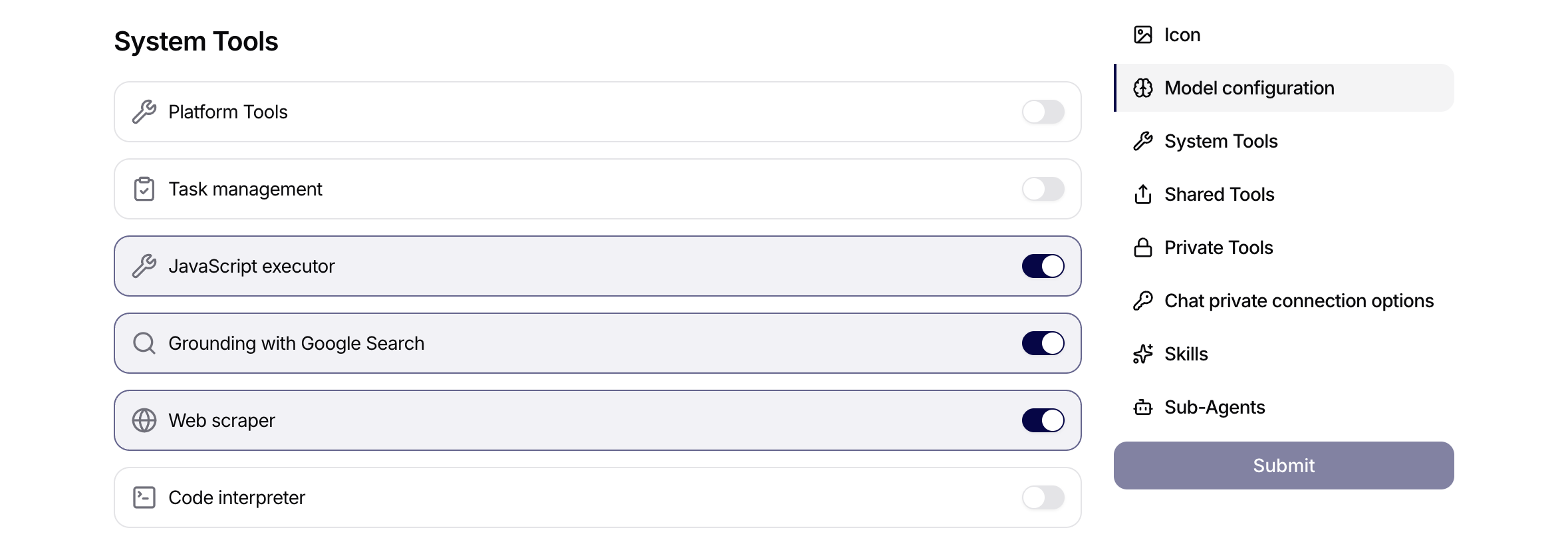
How System Tools Reach an Agent
Siesta.AI.App loads the available System Tools and stores their selected IDs on the agent. It keeps Shared and Private Connection Tools in separate form sections. Templates can also include System Tool assignments.
Siesta.AI.Backend then creates the executable catalog. System Tools reach it in two ways:
- runtime builders construct Task Management, Image generation, Sandbox, SiestaAI Help, Platform Tools, Orchestration, and JavaScript Executor,
- system-owned Connections supply Google Search and Firecrawl functions implemented in Siesta.AI.Tools.
System-owned connection functions bypass ordinary user connection ownership lookup because their credential belongs to the system organization. Organization-level connection governance still applies.
Platform Tools
The Platform Tools capability creates, reads, searches, or updates Siesta AI objects. The frontend hides this privileged capability from normal Users. The backend adds its functions only when the agent has Platform Tools assigned and the current user has the Owner or Admin role.
Assignment alone is therefore not enough. An Owner/Admin role alone is also not enough. Both checks must pass for the Platform_* functions to enter the runtime catalog.
System Tool Overview
| System Tool | Runtime surface | What it does | Important prerequisite |
|---|---|---|---|
| Task Management | Platform_CreateTask | Creates a task in the agent's configured task workspace. | Agent must have TaskWorkspaceId. |
| Grounding with Google Search | GoogleSearch.Search | Searches Google Custom Search and returns URLs, snippets, and limited scraped page context. | Assigned System Tool must reference the system GoogleSearch connection. |
| Web scraper | Firecrawl functions | Scrapes, crawls, maps, or searches web content through Firecrawl. | Assigned System Tool must reference the system Firecrawl connection. |
| Image generation | image_generation | Generates an image and stores the PNG output as a conversation artifact. | Assigned tool and a supported OpenAI gpt-* agent. |
| Sandbox | runCommand, readFile, writeFile, listFiles, publishFiles | Runs commands and file operations in an isolated, conversation-scoped Linux workspace. | Sandbox must be enabled for the environment and assigned to the agent with a base image. |
| SiestaAI Help | siesta_help_resolve | Diagnoses missing connection/tool setup and returns guidance or action cards. | Assigned System Tool. |
| Platform Tools | Platform_* functions | Creates, reads, searches, and updates Siesta platform objects. | Owner/Admin user context and assigned Platform Tools. |
| Orchestration | run_function_batch | Sends many inputs to a named sub-agent function. | Agent must have sub-agents for useful calls. |
| JavaScript executor | JsExecutorAgent | Runs synchronous JavaScript with sub-agent, Excel, status, and artifact helpers. | Assigned System Tool. |
Task Management
Task Management exposes one function: Platform_CreateTask.
Use it only when the user explicitly asks to create a task. The backend function description says: create a task only when the user explicitly asks and never call it proactively.
What It Does
Platform_CreateTask creates a TaskItem in the task workspace assigned to the current agent. It stores the current conversation and current agent as source references when the source conversation still exists. The created task receives an icon resolved from the requested icon, summary, and prompt.
If the workspace has auto-execution enabled, the backend immediately starts task execution using the explicitly assigned agent or the workspace default agent.
Inputs
| Field | Required | Behavior |
|---|---|---|
summary | Yes | Short task summary. Empty values fail. |
prompt | No | Detailed task prompt. Defaults to an empty string. |
icon | No | Requested icon filename. The backend resolves it through the task icon resolver. |
status | No | Parsed as Todo, InProgress, Review, or Done; defaults to Todo. |
assignedChatBotId | No | Optional UUID of the agent assigned to the task. Invalid UUID fails. |
assignedChatBotName | No | Optional exact agent name. If multiple agents match, the backend asks for assignedChatBotId. |
Output And Failure Modes
On success, the tool returns task ID, summary, status, and a button labeled Open task.
The call fails when:
summaryis missing,- the agent has no task workspace,
- the workspace is inaccessible or the user cannot write to it,
assignedChatBotIdis invalid,assignedChatBotIdandassignedChatBotNamerefer to different agents,assignedChatBotNameis missing, ambiguous, or inaccessible.
Grounding With Google Search
Grounding with Google Search is implemented through the GoogleSearch tool connection. The System Tool links to a system-owned GoogleSearch connection, and the runtime adds its connection function to the agent.
Function
GoogleSearch.Search performs a Google Custom Search request and returns ranked results. The implementation also tries to fetch each result URL and extract a short text context from paragraphs, headings, and list items. It removes common non-content tags such as scripts, styles, navigation, headers, footers, iframes, SVGs, and noscript blocks.
Inputs
| Field | Required | Behavior |
|---|---|---|
query | Yes | Search query. It should be specific. |
count | No | Number of results from 1 to 10. Values are clamped; default is 3. |
country | No | Google gl country code, for example us, cz, or sk; default is cz. |
timePeriod | No | Google dateRestrict, for example d1, w1, m1, or y1. |
Output And Use
The model receives:
- result title,
- result URL,
- snippet,
- optional scraped page text, truncated to keep context small.
The user-facing result lists found URLs and can include a View on Google button.
Use this tool when the answer depends on current public information, search result ranking, or time-bounded research. Do not treat search results as verified internal truth; the assistant should compare and cite sources when accuracy matters.
Web Scraper
Web scraper is implemented through the Firecrawl tool connection. The System Tool links to the system Firecrawl connection. It is read-oriented: it fetches external content but does not write to the target website.
Functions
| Function | Inputs | Backend behavior |
|---|---|---|
ScrapePageAsync | url, onlyMainContent | Calls Firecrawl scrape, requests markdown, and returns the page title plus markdown. |
CrawlSiteAsync | url, limit, includePaths, excludePaths | Starts a Firecrawl crawl, polls until completion or timeout, and combines page markdown with source URLs. |
MapSiteAsync | url, search, limit | Calls Firecrawl map and returns discovered links, including title/description when available. |
SearchWebAsync | query, limit | Calls Firecrawl search and returns markdown or descriptions from top web results. |
Output And Use
Use Web scraper when the user gives a specific URL, asks to inspect a site, wants SEO/content review, wants a site map, or needs page content turned into structured context.
Important boundaries:
- It can fetch sensitive URLs if the agent is allowed to see them, so prompts should be clear about what may be scraped.
- It depends on the Firecrawl API key and configured API URL.
- Crawl jobs can fail, time out, or return no pages.
- External page content can be stale, misleading, copyrighted, or policy-restricted.
Image Generation
Image generation is a System Tool that lets a supported agent generate an image from a text request. The current app-dev System Tools catalog exposes this tool.
The runtime adds image_generation only when both conditions are met:
- Image generation is assigned to the agent.
- The agent uses an OpenAI provider model whose name starts with
gpt-.
Bring-your-own models, non-OpenAI providers, and other model-name families do not receive the tool. The runtime uses gpt-image-2, uploads a successful result as image/png, and stores it as an artifact on the assistant message. Failures appear as a failed image-generation tool execution instead of a usable image.
Verified Surface And Boundary
A live app-dev check with a supported test agent generated generated-image-1.png. Web Chat displayed Preview and Download for the artifact. This verifies the web Chat path only; it does not establish that the Browser Extension, Windows App, macOS App, or Mobile App exposes the same workflow.
Ask for the subject, composition, aspect ratio, visual style, colors, and any text restrictions. Review the result before publishing it, especially for branding, factual diagrams, people, regulated content, or rights-sensitive material.
Code Interpreter Availability
Code Interpreter is not available in the current System Tool catalog or executable agent runtime. Legacy source and configuration references to CodeInterpreterAgent may still exist, but they do not make the tool assignable or callable. Do not design a user workflow around it. For deployment-enabled command and file work, use Sandbox and publish finished files explicitly.
Sandbox
Sandbox gives an agent an isolated Linux workspace for command and file work. Enable Sandbox under the agent's Configuration > System Tools and select a Base image from the server-provided catalog. When the catalog is available, the selection is required and unknown values are rejected. The tool is shown only when the deployed environment makes Sandbox available.
Sandbox is different from the user's computer:
| Runtime | Main purpose | File and execution boundary |
|---|---|---|
| Sandbox | General command execution and explicit file publishing controlled by the agent. | A Linux workspace dedicated to one conversation. It cannot access the user's local files unless they are uploaded and explicitly staged. |
| User computer | The user's local applications and filesystem. | Not mounted into Sandbox and not controlled by runCommand. |
Code Interpreter is not a third available runtime in the current catalog. Historical references to it should not be used as evidence of availability.
Session and command lifecycle
The first Sandbox operation lazily provisions a session for the current conversation with the base image selected on the agent. Later calls in that conversation reuse the same session and disk. Changing the agent's Base image therefore affects only newly provisioned sessions; a running conversation keeps its original image. Each runCommand call starts a fresh bash -lc shell in /mnt/work, but files and installed packages can remain on the conversation disk between calls.
Only one Sandbox operation for a conversation runs at a time. A lease serializes calls across application instances while organization and user concurrency controls limit the number of active sandboxes. An idle session can be suspended and resumed. If the provider session is gone, failed, or reset, the next operation may create a replacement; the agent must then recreate workspace files and reinstall packages it still needs.
Deleting the conversation tears down its Sandbox resources. Reconciliation also retires orphaned or failed sessions. A workspace is therefore conversation-scoped working state, not a durable document store.
Network access follows the deployed Sandbox allowlist. Do not assume that an arbitrary internet host is reachable, and do not place credentials in commands, scripts, filenames, or published output.
Tools
| Function | Purpose | Important behavior |
|---|---|---|
runCommand | Runs a shell command in /mnt/work. | Returns exit code, stdout, and stderr. A command has a deployment-configured wall-clock timeout, and long output can be truncated. |
writeFile | Writes a UTF-8 text file. | The relative path must remain inside /mnt/work. Large content must be created through a command rather than one oversized call. |
readFile | Reads a text or binary workspace file. | Text is returned as text; binary content is base64 encoded. The result reports when it was truncated. |
listFiles | Lists one workspace directory. | The listing is not recursive and reports each entry's name, size, and directory state. |
publishFiles | Publishes selected files as message artifacts. | Each relative path must name an existing file, not a directory. Nothing is published automatically. |
The deployed command, read, write, staging, publishing, and concurrency limits can vary by environment. Treat an error that reports a concrete limit as authoritative for that deployment. Public documentation should not replace that value with a source-code default that has not been verified against the production configuration.
Stage input files
Conversation attachments and artifacts are not copied into the Sandbox automatically. The agent lists every required file in the files argument of runCommand. Siesta AI stages the selected inputs under /mnt/work/in and returns their exact paths in stagedFiles.
Use the returned path instead of guessing a filename. A staged file must satisfy the per-file and per-conversation transfer limits. Missing, inaccessible, or oversized inputs fail before the command should rely on them.
Work with files and publish a result
A safe file workflow is:
- The user uploads
sales.csvand asks for a cleaned export. - The agent calls
runCommandwithsales.csvinfiles. - Siesta AI stages the selected attachment into
/mnt/work/inand returns its path. - The agent reads that path, writes an output such as
/mnt/work/cleaned-sales.csv, and verifies it. - The agent calls
publishFileswithcleaned-sales.csv. - Siesta AI attaches the published name, size, and content type to the assistant message as a downloadable artifact.
Files that remain only in /mnt/work are intermediate workspace state. They are not visible to the user, not automatically published, and not a durable replacement for Data or Memory. Publishing the same path after changing the file creates a new artifact rather than silently replacing the earlier download.
Failures and approval
Expected failures include unavailable capacity, provisioning or resume timeout, a busy session or expired lease, command timeout, a nonzero exit code, truncated output, reset workspace, missing input, path traversal, oversized transfer, missing publish target, and partial publishing where some requested files fail.
The agent should report the failure and preserve any successful published files. After a reset it should recreate only the files and packages needed to continue.
Do not assume that runCommand always requires confirmation. The Sandbox function does not by itself guarantee an approval prompt; the deployed runtime and tool policy must provide that behavior. Before enabling Sandbox for a shared or production agent, verify the actual approval flow and review the command in tool detail before allowing execution.
For base-image problems, use the failure stage to choose the next step:
| Symptom | Meaning | Action |
|---|---|---|
| Sandbox is not listed, or Base image has no choices | The environment does not expose Sandbox or has no enabled image catalog. | Ask the environment administrator to verify feature availability and enabled images. |
| The form requires Base image or rejects the saved value | No current catalog image is selected, or the stored value is no longer valid for a new selection. | Choose a listed image; never type or reuse an unlisted ID. |
| Provisioning fails after the agent saves successfully | The selection passed form validation, but the session or image could not be provisioned. | Retry after checking deployment capacity and image availability; changing an existing conversation does not rebuild its session. |
SiestaAI Help
SiestaAI Help exposes siesta_help_resolve.
It is a diagnostic and guidance tool for connection setup, tool assignment, and platform documentation questions. It does not create permissions by itself. It resolves what the user appears to need and can return either a normal help answer or an action card with setup buttons.
Enable it on the agent in Configuration -> System Tools by turning on SiestaAI Help in the System Tools list.
Inputs
| Field | Required | Behavior |
|---|---|---|
userRequest | Yes | Original user request that needs help or connection diagnostics. |
capability | No | Best matching capability, such as email.send, calendar.create_event, drive.read_file, slack.send_message, jira.create_issue, connections.setup, or connections.assign. |
targetService | No | Explicitly named service such as Gmail, Outlook, Google Calendar, Google Drive, Slack, Jira, or HubSpot. Do not infer Gmail/Outlook from generic "email". |
targetServices | No | Explicitly named services when the user asks to set up or assign multiple connections. |
targetServiceMentionedByUser | No | True only when the user explicitly named the service. |
targetAgentId | No | Agent ID that should receive connection/tool setup. Prefer IDs returned by Platform Tools. |
targetAgentName | No | Agent name when no target ID is available. |
targetAgentMentionedByUser | No | True when the user asked to configure a specific agent. |
intent | No | Use connection_setup, connection_assignment, connection_diagnostics, or platform_docs. |
topic | No | Canonical documentation topic such as workflows, connections, agents, or tools. |
Output And Use
The result includes a title, message, state metadata, optional docs URL, and sometimes a primary button/action. If action labels are returned, the assistant should tell the user to use the shown buttons instead of explaining a long manual navigation path.
Use it when the user says an agent cannot use Gmail, Outlook, Drive, Slack, Jira, HubSpot, calendar, or another external service; when they ask how to connect a tool; or when they ask for platform documentation.
Platform Tools Functions
Platform Tools exposes privileged Platform_* functions for operating Siesta AI itself.
They are gated in two ways:
- the agent must have Platform Tools assigned,
- the current user must be Owner or Admin in chat execution.
The Platform Tools capability is hidden from normal Users.
Enable Platform Tools under Configuration > System Tools. This enables the administrative capability; the other tools in the section have their own switches.
Agent Functions
| Function | What it does | Important fields |
|---|---|---|
Platform_CreateAgent | Creates a new agent. The new agent uses the current agent's model and connection unless overridden. | name, systemMessage, description, modelName, temperature, maxTokens, presencePenalty, frequencyPenalty, initialMessage, reasoningEffortLevel |
Platform_CreateAgentFromTemplate | Creates an agent from a template exactly using the template configuration. | templateId |
Platform_GetAgent | Reads a single agent. Omit ID or pass self for the current agent. | id |
Platform_ListAgents | Searches organization agents by name. | search, limit |
Platform_UpdateAgent | Updates an existing agent. Omit ID or pass self for current agent. Only provided fields are changed. | Agent fields plus skillIds, memoryCollectionIds, memoryPageIds, systemToolIds, subAgentIds |
Platform_ListConversations | Lists recent private conversations for an agent. Hidden, shared, and public conversations are excluded. | agentId, search, limit |
Platform_ListMessages | Lists recent messages from a private conversation. Hidden, shared, and public conversations are excluded. | conversationId, search, role, limit |
Platform_UpdateAgent replaces full assignments for arrays that are provided. Passing skillIds, systemToolIds, or subAgentIds means "set the complete list", not "append". Passing memory collection/page arrays replaces all current memory page assignments.
Platform_GetAgent returns agent details including prompt, model settings, skills, memory collections/pages, assigned System Tools, and sub-agents.
Skill Functions
| Function | What it does |
|---|---|
Platform_CreateSkill | Creates a skill with name, instructions, and optional description. |
Platform_GetSkill | Reads one skill, including full instructions. |
Platform_ListSkills | Searches organization skills by name. |
Platform_UpdateSkill | Updates name, instructions, or description. Only provided fields are changed. |
Skills define reusable behavior for agents. Updating skill instructions can change behavior for every agent that uses the skill.
Template Functions
| Function | What it does |
|---|---|
Platform_GetTemplate | Reads one agent template including full configuration. |
Platform_ListTemplates | Searches organization templates by name. |
Templates can copy prompts, model settings, skills, memory assumptions, and System Tools into new agents. Review templates before using them to create privileged agents.
Memory Functions
| Function | What it does | Important fields |
|---|---|---|
Platform_CreateMemoryCollection | Creates a Memory collection in the current organization. | name |
Platform_GetMemoryCollection | Reads a Memory collection. | id |
Platform_ListMemoryCollections | Searches Memory collections. | search, limit |
Platform_UpdateMemoryCollection | Updates collection name. | id, name |
Platform_CreateMemoryPage | Creates a Memory page inside a collection. | collectionId, name, body, order, parentId |
Platform_GetMemoryPage | Reads a Memory page. | id |
Platform_UpdateMemoryPage | Updates page name, body, order, or parent. | id, name, body, order, parentId |
Memory created through Platform Tools becomes reusable context. Treat it as operational knowledge, not temporary chat output.
Orchestration
Orchestration exposes run_function_batch.
Inputs
| Field | Required | Behavior |
|---|---|---|
functionName | Yes | Name of the sub-agent function to execute for every input. |
input | Yes | Array of input strings. |
The backend creates a private conversation for the selected sub-agent for each input string, sends the input as a message, and combines the results. It runs in parallel with a maximum concurrency of 40.
Use it for repeatable batch work such as classification, summarization, scoring, extraction, or repeated specialist review. Do not use it when a single direct answer or one sub-agent call is enough.
Orchestration is a callable batch tool. It is not the same as the Agent harness, which controls planning, conversation To-dos, and supported background delegation.
JavaScript Executor
JavaScript executor exposes JsExecutorAgent.
It runs synchronous JavaScript in a Jint engine and returns log output plus the final expression result. Objects and arrays are converted through JSON.stringify for readable model output.
Available Helpers
| Helper | Behavior |
|---|---|
log(message) | Adds internal log output returned with the result. |
logStatus(message) | Publishes a real-time status update visible to the user. |
callAgent(name, prompt) | Synchronously creates a private conversation with a named sub-agent and returns its response. |
callAgentsParallel(names, prompts) | Calls multiple sub-agents in parallel; names and prompts must have equal length. |
readExcelFile(fileName, sheetName, maxRows?) | Reads rows from an attached Excel file. |
listExcelSheets(fileName) | Lists sheet names in an attached Excel file. |
writeExcelFile(fileName, sheetName, rows) | Writes rows to a new Excel file. |
createExcelDocument(fileName, sheetName, rows) | Creates an Excel file and attaches it as a downloadable conversation artifact. |
searchExcelRows(fileName, sheetName, columnName, searchValue) | Searches rows by case-insensitive column value match. |
getExcelColumnStats(fileName, sheetName, columnName) | Returns numeric column stats: min, max, sum, average, count. |
copyFileAsArtifact(sourceFileName, newFileName) | Copies a conversation attachment into artifacts and returns file metadata. |
editArtifactFile(fileId, content) | Replaces content of an artifact previously created for editing. |
Usage Rules
- All helper functions are synchronous.
- Do not use
async,await, or Promises. - Use
logStatus()before significant work so the user sees progress. - Use it when loops, branching, aggregation, spreadsheet processing, or controlled sub-agent orchestration are clearer in code than in natural language.
- Limit it to trusted/admin or power-user agents because it can call sub-agents, process files, and create artifacts.
Governance Notes
Enable System Tools intentionally.
- Task Management can create persistent work and may auto-execute tasks.
- Grounding with Google Search and Web scraper read public or reachable external content, which can be stale, misleading, sensitive, or policy-restricted.
- Image generation creates PNG artifacts. Review the prompt and output before publishing or operational use.
- Sandbox can execute commands and publish files from an isolated conversation workspace. Verify command approval, network policy, base image, and deployment limits before broad use.
- SiestaAI Help guides setup but does not grant permissions.
- Platform Tools can change agent behavior, Skills, Memory, sub-agents, and System Tool assignments.
- Orchestration can create many sub-agent conversations quickly.
- JavaScript executor can run scripted logic, call sub-agents, process Excel files, and create artifacts.
When System Tools are included in a Template, newly created agents can inherit them. Review System Tool assignments before publishing Templates broadly. Use Tool Executions to inspect arguments, results, status, errors, and approvals.
User-Safe Examples
Use web search to verify this, then cite what you found.
Do not rely only on memory.
Scrape this URL and summarize only facts visible on the page.
Create a task from this conversation with summary, prompt, and status Todo.
Check whether this agent has the right connection assigned. If not, show me the setup action.
Analyze this spreadsheet and create a downloadable cleaned version.
Use the JavaScript executor to read the attached Excel file, group rows by owner, and create a cleaned workbook.