Overview
The Overview tab is the starting point for checking an agent's current state. It gives agent owners and admins a compact operational summary before they open deeper tabs.
The current application renders these overview areas:
- General: agent name, model, credentials, description, and assigned shared/private tools.
- Evolution: whether prompt evolution is currently possible for the agent.
- Feedbacks: recent feedback activity for the last period.
- Conversations: conversation activity for the last period.
- Users conversations: the top active users for the selected agent.
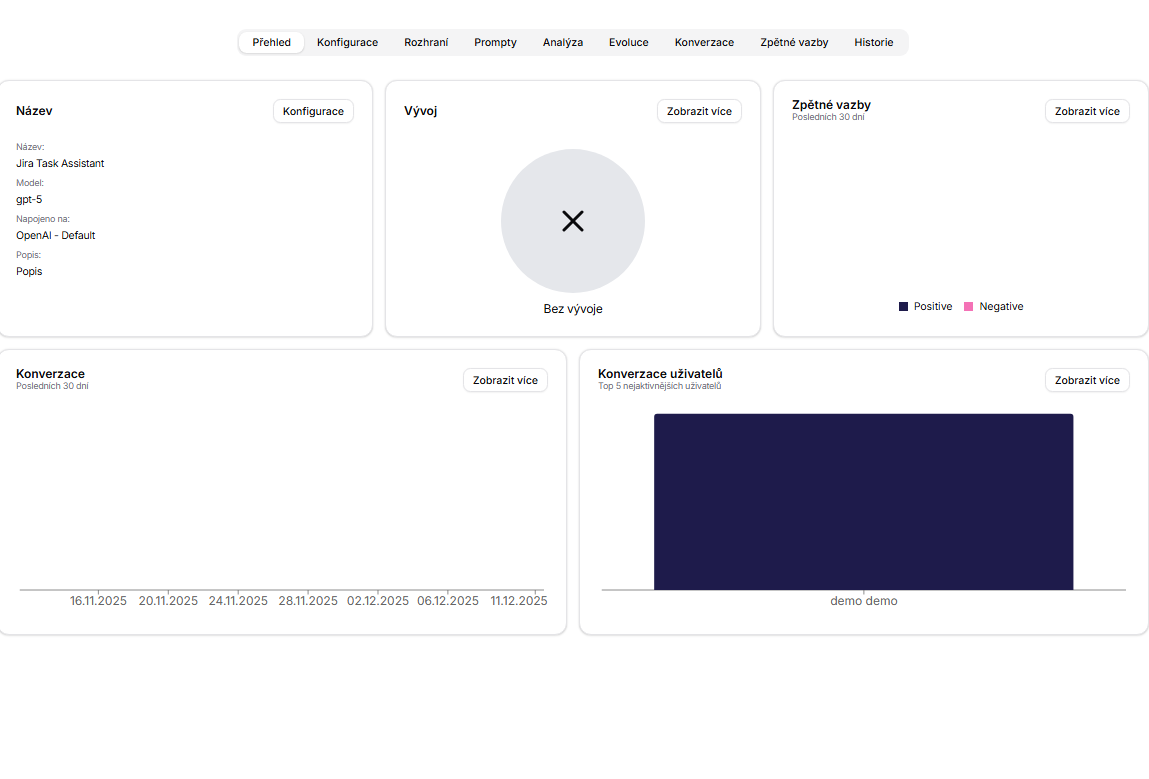
General Card
The General card shows the identity and runtime baseline of the agent:
- name,
- model name,
- credential or AI connection name,
- description,
- assigned tools.
The tool display combines shared tools and private tools. The card shows up to the visible tool limit and then displays a hidden count when more tools are attached. Tool icons include their visibility type so owners can distinguish organization-level tools from private user-context tools.
The card also includes a favorite action and a Start chat action. Starting chat clears the current conversation context and opens chat with the selected agent.
Health Signals
The remaining cards are designed for quick triage:
- use Evolution to see whether feedback can drive a new prompt evaluation,
- use Feedbacks to spot recent positive or negative reactions,
- use Conversations to understand current usage volume,
- use Users conversations to see which users interact with the agent most often.
If a metric suggests a problem, open the related tab for full context instead of editing the agent from the overview alone.