Evolution
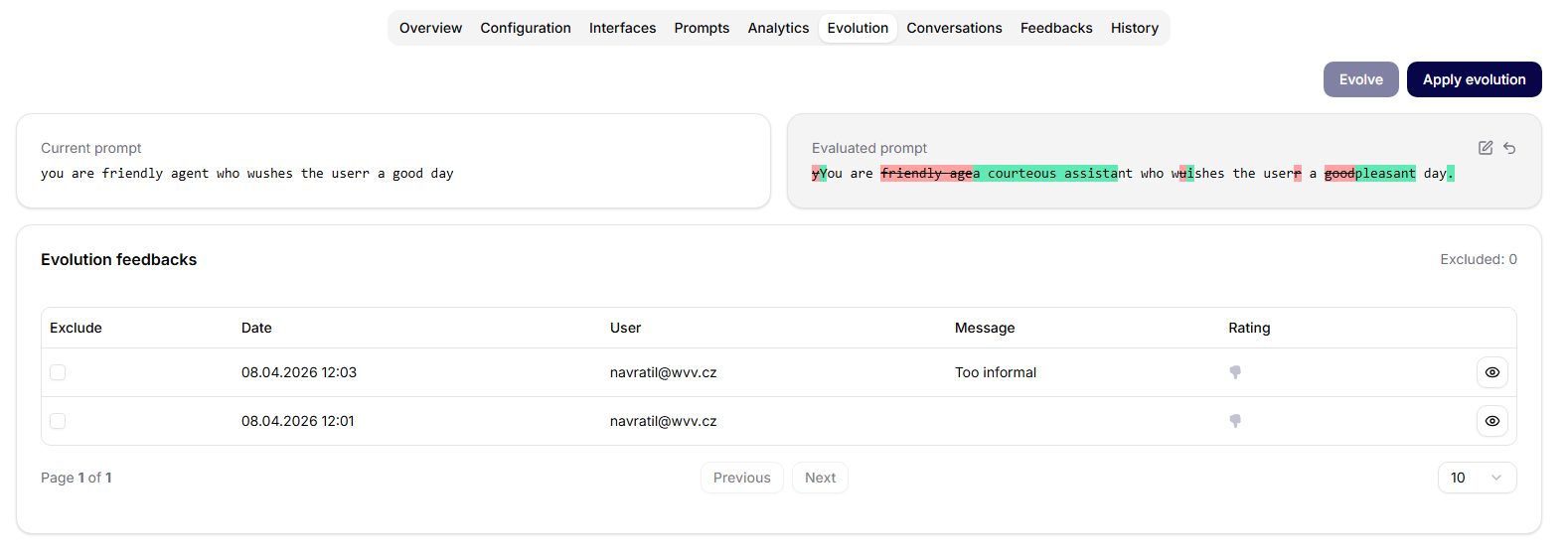
The Evolution tab supports controlled improvement of the agent from real feedback. It compares the current prompt with an evaluated prompt and lets owners apply approved changes.
Feedback Input
The tab loads unapplied feedback for the agent. Users can review feedback records and exclude selected feedback items from the next evolution run.
Evolution can start only when there is feedback available and no evaluated prompt is already waiting to be applied.
Evolve
The Evolve action sends the selected feedback context to the evolution flow. When it succeeds, the tab shows:
- the current prompt,
- the evaluated prompt,
- a diff-style view between the two.
Users can edit the evaluated prompt before applying it. The UI tracks whether the evaluated prompt has been modified and provides an undo action to return to the generated evaluated text.
Apply Evolution
The Apply evolution action saves the evaluated prompt back to the agent. After a successful apply, the tab shows a success alert and refreshes the feedback list.
Use Evolution for deliberate, reviewable prompt improvement. Do not apply changes blindly: review the diff, confirm the feedback actually supports the change, and test the agent after applying it.