Teams
Use Users → Teams to group people who should reach the same shared work. Roles decide which actions a person can perform; teams and resource access policies decide which agents, workflows, connections, Data, Memory, recordings, and task workspaces they can reach.
Opening the Teams tab requires Teams.View. Creating and editing teams requires Teams.Edit, and deleting a team requires Teams.Delete.
Teams Overview
Use search to find a team or select Add Team to create one. The table shows:
- Name and Description,
- Agents as All when the team applies to every agent, or as the number of assigned agents,
- Users as member avatars and the total member count,
- available Edit and Delete actions according to your permissions.
Select any screenshot to open it at full resolution.

People with view-only access can read the list, but team names do not open the edit page and management actions stay hidden.
Creating a Team
- Open Users → Teams and select Add Team.
- Enter a clear Name and optional Description.
- Search for and select the Users who belong to this access boundary.
- Decide whether to enable Disable dashboard.
- Select Submit.
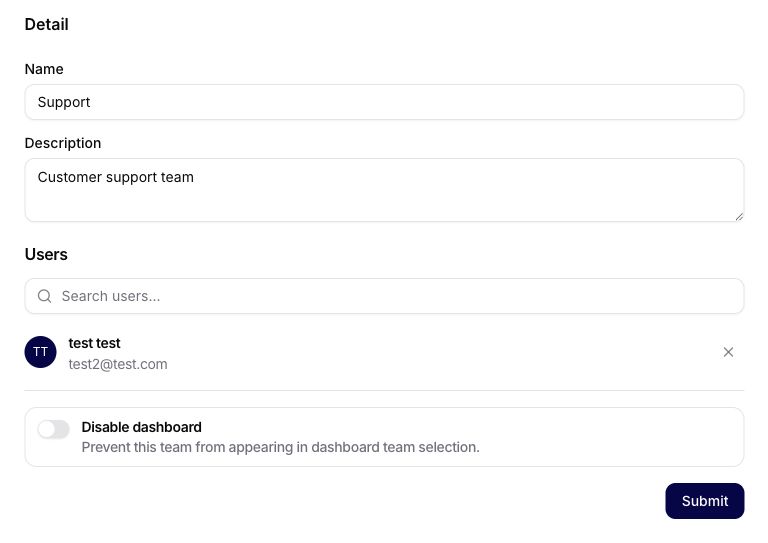
Disable dashboard
Enable Disable dashboard when the team should not appear in the dashboard team selector. This only controls dashboard selection; it does not delete the team, remove its members, or replace the access policies on shared resources.
Editing or Deleting a Team
Open a team name or use Edit to change its name, description, members, or dashboard setting. Review the complete member list before saving because every added user can receive access to resources shared with that team.
Use Delete only when the access boundary is no longer needed. Before deleting, move users and shared resources to their replacement teams so that production access does not disappear unexpectedly.
How Team Access Works
Team membership does not grant every product action by itself. Access normally requires all applicable gates:
- The user's role grants the required capability, such as viewing or editing agents.
- The resource is available organization-wide or shared with one of the user's teams.
- Any additional feature, connection ownership, provider, or deployment restrictions are satisfied.
Use teams for durable access groups such as Support - Production or Finance - Reporting, not as a substitute for product roles.
Troubleshooting Team Access
If a user cannot access a shared resource:
- Confirm the user belongs to the correct organization.
- Open the team and confirm the user is still a member.
- Open the resource and confirm it is shared with that team at the required level.
- Check that the user's role grants the required view, use, or edit capability.
- Confirm that Disable dashboard is not hiding the team only from the dashboard selector.
Related Guides
- Admins: Plan Your Organization Setup
- Admins: Create Teams and Assign Users
- Admins: Define Access Policies and Visibility Rules