Controls
The current appearance of the application screen after logging in.
Left Panel
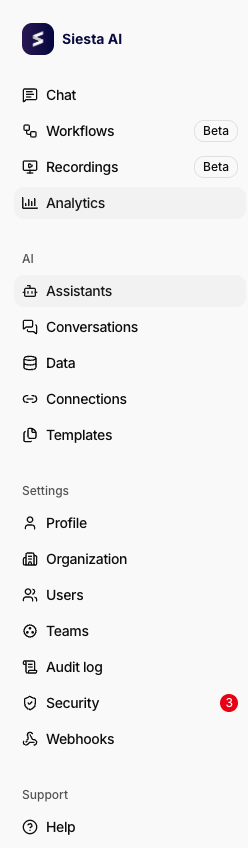
- Main section with items: Chat, Workflows (label Beta), Recordings (label Beta), Analytics (Admin).
- AI section: Agents, Conversations (Admin), Data, Connections, Templates.
- Settings section: Profile, Organization (Admin), Users (Admin), Teams, Audit log (Admin), Security, Webhooks.
- A red badge with the number of active recommendations may appear next to the Security item.
- Support section: Help.
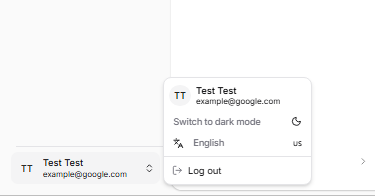
- At the bottom, the user card; when clicked, a menu appears with options: Switch to dark mode (crescent moon icon), language selection "English" with code "us", and the item Log out.
Example of the main navigation in the left panel.
Example of the user menu at the bottom of the panel.
Entity Sharing
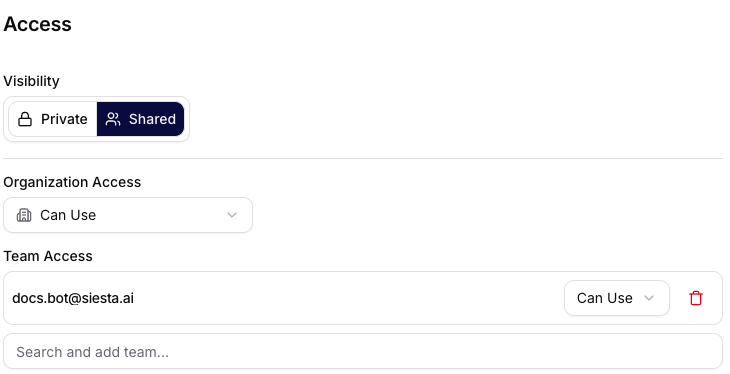
- For the entities Workflows, Agents, and Data, you can toggle visibility between Private and Shared in the Access section.
- In Organization Access, you set the default permissions for the entire organization.
- Sharing can be set for both Teams and individual users.
- For each added team or user, you can choose permissions Can Use or Can Edit and revoke access at any time.
Conversation List
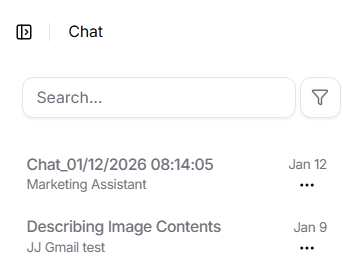
- Header "Chat" and search field "Search" with a filter icon.
- Names of conversations, the name of the agent used, on the right the date of the last message and a menu where conversations can be renamed or deleted.
- The active row is highlighted.
- At the bottom, you will find pagination "Page 1 of 30" with arrows.
Input Field
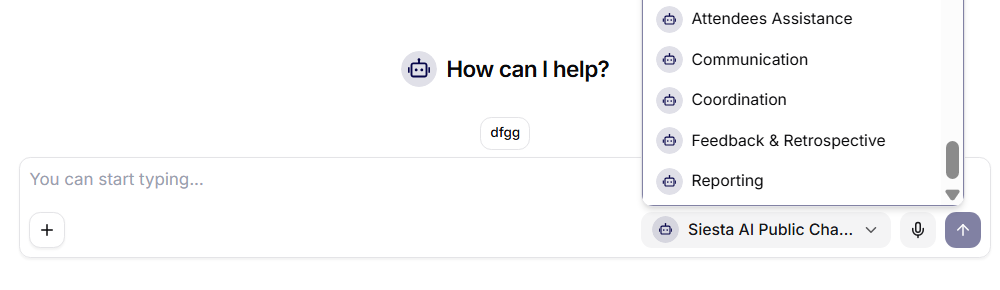
- Title "How can I help?" with an agent icon.
- Below the title, a set of suggestions (chips) with questions in Czech, e.g., "What is the biggest bottleneck in modern web applications?", "What technologies are currently shaping the development world?", "Why is the market rising or falling today?".
- Input field with a placeholder "You can start typing", on the left a "+" button to add content.
- On the right inside the field, agent selection "Chat Bot" with an avatar and a dropdown arrow, next to it an icon for the microphone and send (up arrow).