Use Sources and Files
Data collections let you reuse trusted files and records across conversations and agents. A collection is not just a folder: Siesta AI imports the selected content, processes it into searchable chunks, and makes those chunks available to assigned agents.
For the complete field-by-field reference, see Data. This guide focuses on the choices a user makes during everyday work.
Detailed Source Setup
Use the source-specific guides for the exact fields and examples shown in the current application:
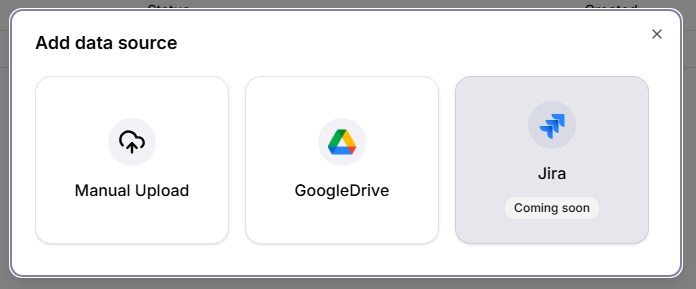
- Choose a Data Source
- Manual Upload
- Google Drive
- Microsoft 365: OneDrive and SharePoint
- Azure Storage Account and Azure File Share
- Automated File Ingestion with Azure File Share
- Jira and Confluence
- Firecrawl
- Processing, Sync, and Troubleshooting
As a user, focus on choosing the authoritative material, entering the right folder, path, or key, verifying indexed documents, and testing the agent. Follow Use Connections Safely for personal access; ask an admin to prepare shared credentials, change access boundaries, or resolve provider-wide authentication failures through Admin Data Governance.
Decide Between An Attachment And A Collection
| Situation | Use |
|---|---|
| You need one file in one conversation | Attach the file in Chat |
| The same source should serve several conversations or agents | Data collection |
| A folder or external system changes over time | Synchronized data source |
| The content is a signed-off snapshot that should not change silently | Manual Upload |
| The information is short knowledge you maintain directly in Siesta AI | Memory |
Pick The Source That Matches Ownership
- Manual Upload: you own a stable copy and intentionally replace it when a new version is approved.
- Google Drive: a Google account or Shared Drive owns the live folder.
- OneDrive: one Microsoft user owns or receives the live files.
- SharePoint: a team site or document library owns governed business content.
- Azure Storage Account: an application or data pipeline publishes blobs.
- Azure File Share: an operational file share is the source of truth.
- Jira: project issues are the source of truth.
- Confluence: one space is the maintained knowledge base.
- Firecrawl: an approved website is the source and no native connector is available.
Choose the system that already owns updates. Re-uploading a frequently changing Drive folder manually creates stale copies and makes ownership unclear.
Create A Useful Collection
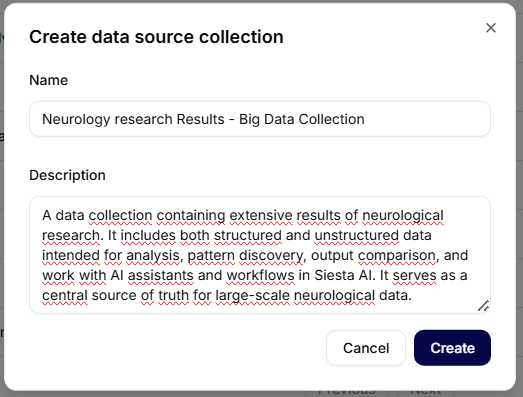
- Open Data.
- Select Create collection.
- Use a name that describes the knowledge, such as
Customer onboarding — approved. - In the description, record the owner, content scope, and intended agents.
- Keep the collection Private unless team or organization sharing is intentional.
Good collections have one purpose. Split HR policies, Sales collateral, and Engineering runbooks instead of creating one collection called Company files.
Add A Manual Upload
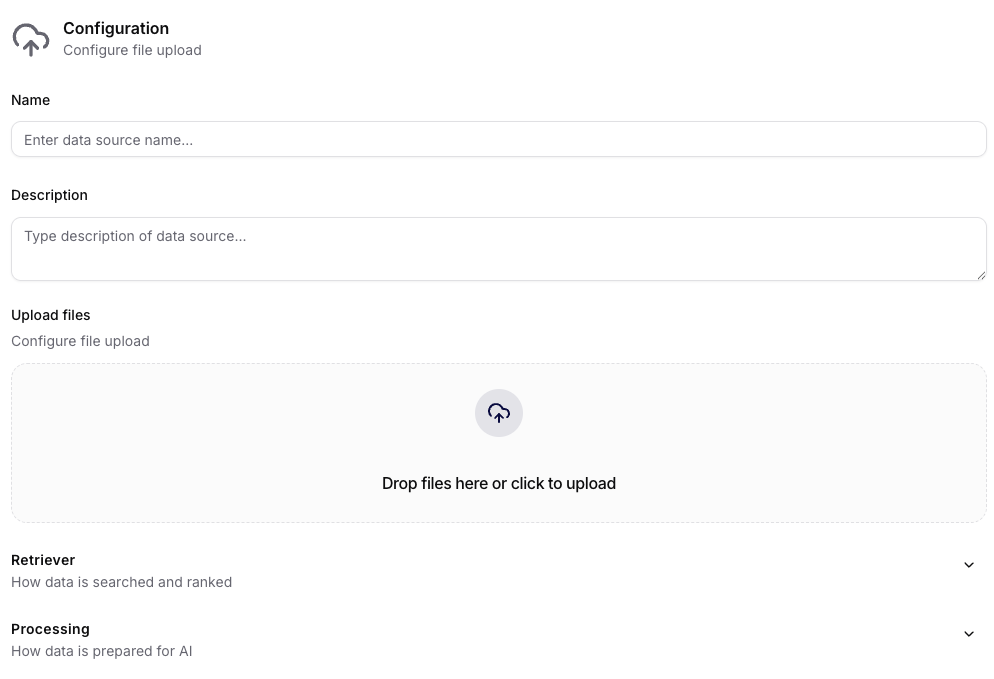
- Open the collection and select Add data source → Manual Upload.
- Name the source after the snapshot or release, for example
Support policies — 2026 Q3. - Upload at least one file.
- Leave processing defaults unless you have tested a reason to change them.
- Confirm and wait for the source to finish processing.
Manual Upload supports the file classes shown in the app: JSON, text, PDF, Word, Excel, PowerPoint, Markdown, and Other. It is best for approved snapshots, exports, signed documents, and small controlled sets.
When a new version arrives, agree with the collection owner whether to replace, delete, or retain the old source. Keeping two documents that give different answers is a common cause of inconsistent agent output.
Add Google Drive
Ask an admin for a shared Google Drive connection, or use a private connection when the source is personal.
- Open the target folder in Drive.
- Copy only the folder ID from the URL after
/folders/. - In the Google Drive source form, select the intended connection.
- Add the folder ID under Folders.
- Enable Include subfolders only if the full tree belongs in the collection.
- Enable Include shared drives when the content is in a Shared Drive.
- Choose a sync frequency based on how often the source changes.
If a file is missing, first confirm that the connected Google account—not only your personal account—can open it.
Add Microsoft Content
OneDrive
Use paths relative to the connected OneDrive, such as:
Documents/Customer Onboarding
Shared/Monthly Reports
Use OneDrive for user-owned content. The source can stop seeing files if sharing or the connected user's permissions change.
SharePoint
Use SharePoint for team-owned libraries and governed departmental documents. Enter the exact library/folder path, for example:
Shared Documents/Policies
If you cannot decide: personal drive content belongs in OneDrive; team-site/library content belongs in SharePoint.
Add Azure Content
Azure Storage Account
The administrator first creates an Azure Storage connection containing the credential. In Data, you select that connection and enter the Blob name/path or selector required for the target storage ingestion. Never paste the connection string or account key into Blobs.
Use this source for application exports, generated documents, archive feeds, or large repositories delivered to Blob Storage.
Azure File Share
Select the prepared connection and add the exact Azure file-share name. Use it for an established file share; do not use it for blobs simply because both live in one Azure Storage account.
If the source succeeds but contains no files, give the admin the connection name, collection name, source name, entered selector/share name, and the latest log status. Do not send credentials in chat or screenshots.
Use an automated Azure File Share feed
In an automated feed, an administrator publishes approved internal documents to Azure File Share and Siesta AI synchronizes them into your collection. You do not need mount commands or storage credentials.
After each relevant update:
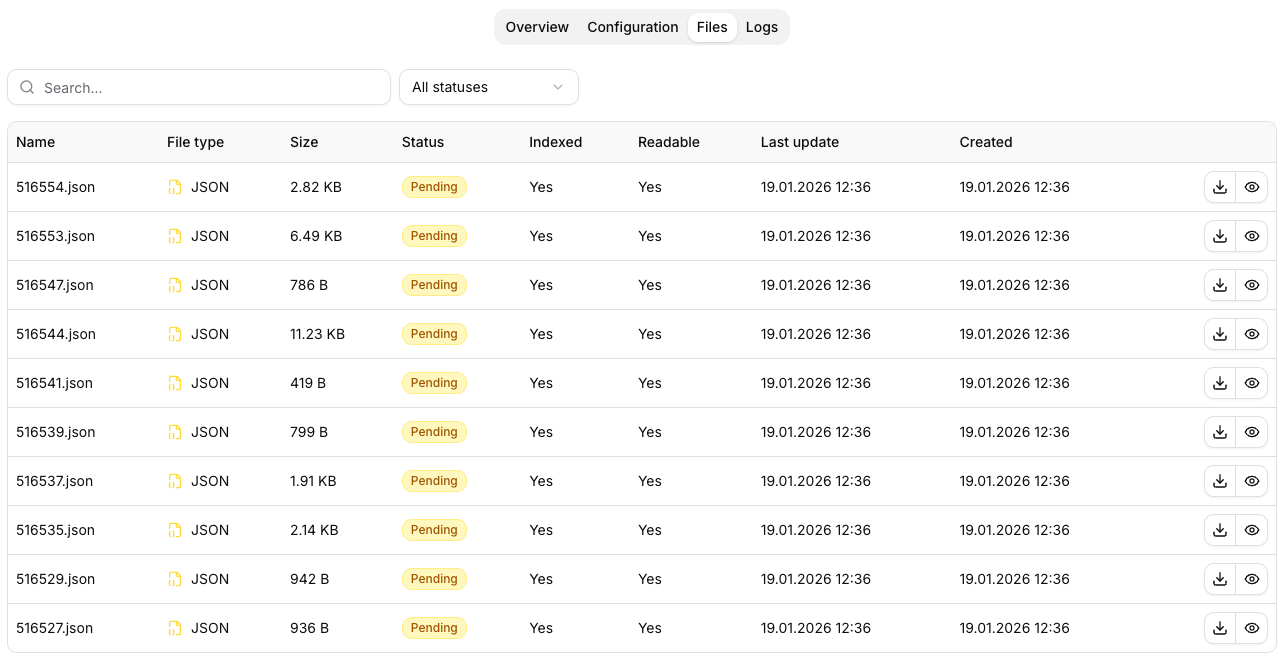
- Open Files and confirm that the expected document is present, Indexed, and Readable.
- Check the document title, source, and visible version information.
- Ask a known-answer question and require a citation to the source document.
- Ask one question that is not covered and confirm that the agent does not invent an answer.
- After a version change, confirm that the citation and answer use the new approved version.
Report stale or missing data with the collection name, source name, expected document, expected version, last sync time, and observed answer. Do not include credentials. An admin can then determine whether the problem is in the upstream selection, Azure publication, ingestion, or agent retrieval.
Add Jira Or Confluence
For Jira, enter the project key such as SUP, not SUP-123, a board name, or JQL. Use it when issue descriptions and status history should be searchable.
For Confluence, select the space key such as HELP. Use it when pages in that space are maintained as the official knowledge base.
If Jira and Confluence have different audiences, keep them in different collections even when both use the same Atlassian account.
Add A Website With Firecrawl
Use Scrape for one page and Crawl for a controlled section of a site. Start small:
URL: https://example.com/docs
Limit: 20
Include paths regex: ^/docs
Exclude paths regex: ^/docs/archive
Do not crawl authenticated applications, personal dashboards, customer portals, or sites that you are not allowed to copy. A broad crawl can import navigation, duplicate pages, outdated versions, and irrelevant content.
Choose A Sync Frequency
- On Demand: signed policies, quarterly exports, and sources that change only after review.
- Daily: operational documentation, active project issues, and frequently updated shared folders.
- Weekly: maintained knowledge whose changes are not urgent.
- Monthly: slow-moving archives and reference material.
Faster is not automatically better. Frequent syncs consume provider and processing capacity and can introduce unreviewed changes into agent answers sooner.
Wait For The Right Status
Do not attach a new source to a production agent merely because it exists.
- Scheduled/Created: ingestion is queued.
- Pending: documents are being processed.
- Processed/Successful: the run completed; verify the files.
- Failed: inspect Logs and correct the connection or selector.
- Skipped: review file types and document readability.
Open Files and check that representative documents are Indexed and Readable. Open one document and confirm that its chunks contain useful text rather than headers, empty output, or corrupted characters.
Use A Collection In An Agent
After the collection owner or admin attaches it to an agent, make the source requirement explicit in your prompt:
Answer from the Customer Onboarding collection only.
For every recommendation, cite the source document name.
If a point is not covered, write “not found in the collection”.
When comparing collections:
Compare the current policy in Approved Policies with the proposal in Draft Policies.
Keep the two sources separate and list contradictions with document names.
Evaluate The Result
Test the agent with four question types:
- A fact you know is present.
- A fact you know is absent.
- A fact that appears in two versions.
- A fact changed since the last synchronization.
If the agent guesses when information is absent, improve the agent instruction. If known text cannot be found, inspect the document and chunks before changing the prompt.
Safe Daily Practices
- Use collection and source names in prompts instead of saying “use the files”.
- Verify the source document before acting on a high-impact answer.
- Do not upload secrets, credential exports, private keys, or files outside the approved audience.
- Do not delete failed documents until the owner decides whether they are needed.
- Ask an admin before changing access from Private to team or organization scope.
- Report stale content with the source name, expected document, last sync, and current status.
Troubleshooting As A User
| Problem | What to do |
|---|---|
| You cannot see a collection | Ask the owner/admin to verify team membership and collection access. |
| The provider connection is missing | Ask for the correct shared connection or create an approved private connection. |
| A folder imports nothing | Recheck the folder ID/path and whether the connected account has access. |
| A source is Failed | Open Logs and send the non-secret error/status context to the admin. |
| A document is present but not used | Confirm Indexed/Readable, inspect chunks, and verify the collection is attached to the agent. |
| The answer uses an old version | Check last sync, trigger a refresh if allowed, and identify duplicate documents. |