Google Analytics
Connecting Google Analytics allows you to link the Siesta AI platform with your analytics account for advanced tracking and data analysis.
Supported Areas
- Real-time tracking: Monitoring current user activity.
- Campaign performance: Detailed reports on the success of your marketing campaigns.
- Behavior analysis: Tracking specific interactions of users with AI agents.
- Policy diagnostics: Checking compliance with advertising rules and approval status.
Notice
In its current state, the agent requires your Customer ID. It cannot be entered in the connection configuration; it must be written in each prompt or entered into Memory, which you then assign to the specific agent. We are working hard on a more convenient solution.
How to Add Google Analytics Connection
The connection is fully automated through Google authorization.
- In the Siesta AI administration, go to the Connections section and click the Add Connection button in the top right corner.
- Select the Google Analytics tile.
- You will be redirected to the standard Google Auth login.
- Log in to your Google account and allow the Siesta AI application access to your analytics data.
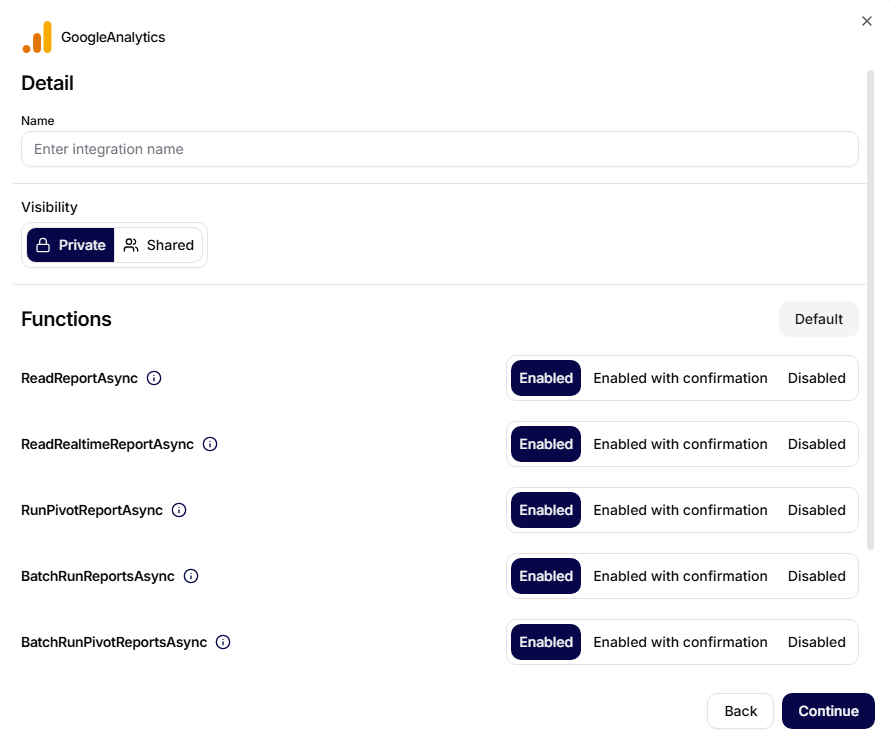
- After returning to the platform, enter the Name of your connection.
- For individual features (see the table below), set the permission level:
- Enabled.
- Enabled with confirmation.
- Disabled.
Connecting to an Agent
To allow the agent to work with analytics data, you must assign the completed connection to a specific agent in the Agent Configuration section. Without this step, the agent will not have access to Google Analytics features.
Features
The connector provides the following tools for working with data:
| Tool | Description |
|---|---|
ReadReportAsync | Standard reading of reports for analyzing long-term trends and performance |
ReadRealtimeReportAsync | Monitoring current user activity in real-time for the last 30 minutes |
RunPivotReportAsync | Creating multidimensional reports using pivot tables for deeper analysis |
BatchRunReportsAsync | Bulk running multiple reports at once, speeding up data loading in dashboards |
BatchRunPivotReportsAsync | Bulk processing of complex analytical pivot queries |
CheckCompatibilityAsync | Checking if selected metrics and dimensions are mutually compatible to avoid errors |
GetMetadataAsync | Automatically loading the current list of available dimensions and metrics from your GA4 account |
Disclaimer
This version of the documentation is in beta and may contain inaccuracies or errors.