Azure Storage Account
The Azure Storage Account serves as a central data repository for blob objects, files, queues, and tables. Applications access this storage using a Connection String, which contains all the necessary authentication and configuration information in a single string.
This mechanism allows for quick integration without the need for manual management of individual connection parameters.
Procedure for Creating a Data Source in the Application
Creating a Data Source Collection
In the application administration:
- Open the Data Sources section.
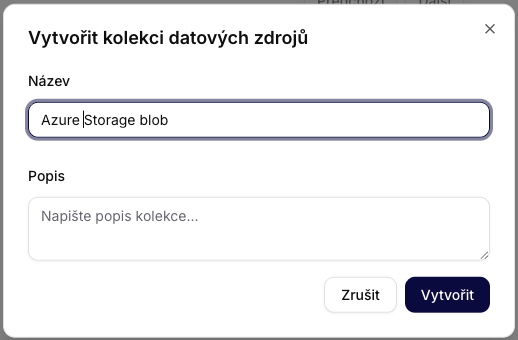
- Select Create Data Source Collection.
- Fill in:
- Name: for example, Azure Storage Blob.
- Description: optional (recommended for documenting the purpose).
Confirm by clicking Create.
Adding an Azure Storage Account
After creating the collection:
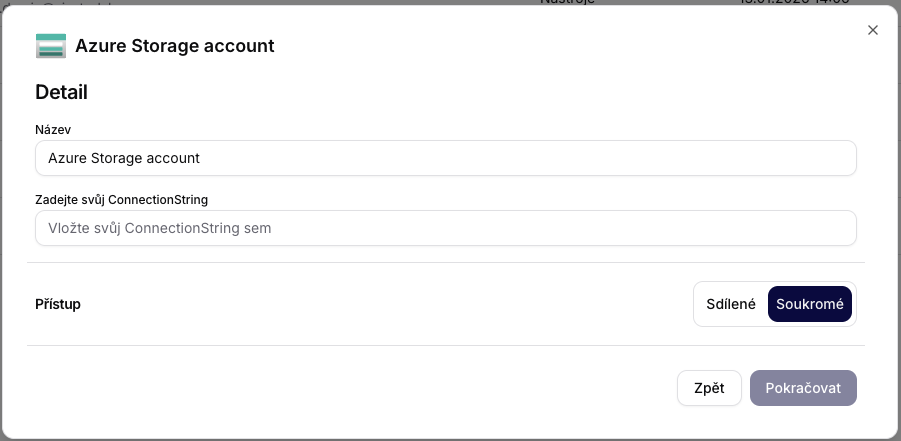
- Select the resource type Azure Storage account.
- Fill in:
- Name: any identifier (e.g., Production Storage).
- Connection String: to be inserted in the next step.
- Set access:
- Private – recommended for production environments.
- Shared – only if necessary.
Proceed by clicking Continue.
Obtaining the Connection String in the Azure Portal
You can obtain the Connection String directly from the Azure Portal from the Storage Account configuration.
Procedure:
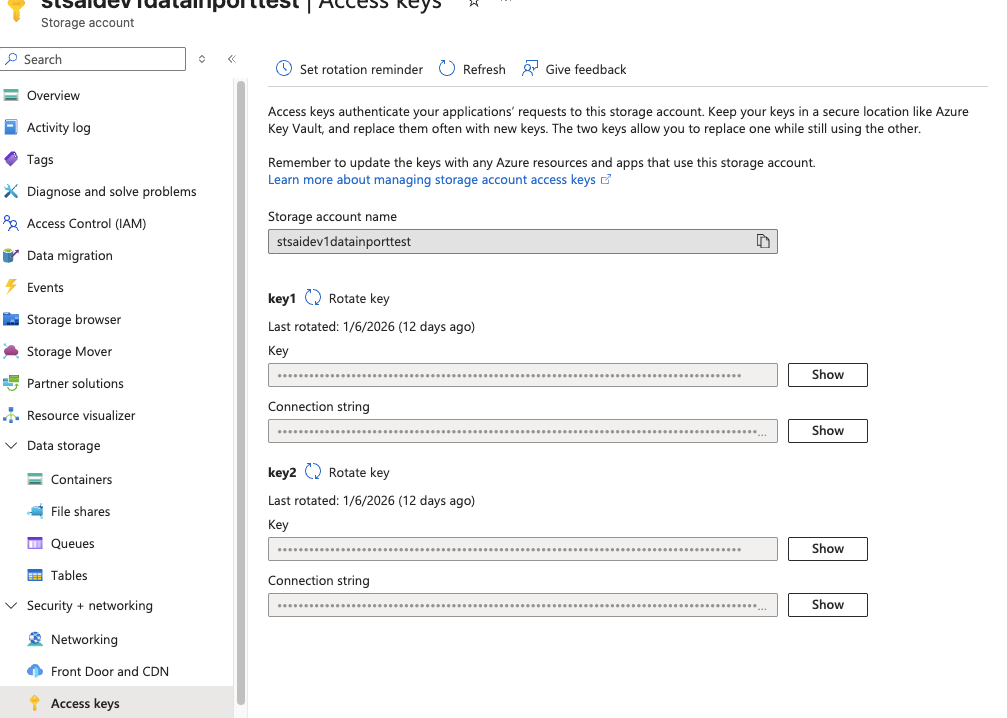
- Log in to the Azure Portal.
- Open the desired Storage Account.
- In the left menu, select Security + networking → Access keys.
- Two active key sets will be displayed:
key1key2
- In the Connection string field, click Show.
- Copy the entire string.
Then paste it into the Connection String field in the application.
What is a Connection String and How Does It Work
A Connection String is a composite authentication string that contains:
- The name of the Storage Account
- The access key
- The protocol type
- The endpoint configuration
Typical format:
DefaultEndpointsProtocol=https;
AccountName=storageaccountname;
AccountKey=BASE64KEY;
EndpointSuffix=core.windows.net
What it means:
| Element | Function |
|---|---|
| Protocol | Ensures encrypted communication (HTTPS) |
| AccountName | Identification of the Storage Account |
| AccountKey | Cryptographic access key |
| EndpointSuffix | Azure regional infrastructure |
The application uses this string to:
- authenticate access,
- identify the target account,
- obtain full permissions based on the type of key.
Summary
The Azure Storage Account is a quick way to connect blobs, files, queues, and tables to Siesta AI. After obtaining the Connection String, simply add the data source to the collection and select the appropriate access.