Google Trends
Overview
The Google Trends Connector provides programmatic access to Google Trends data. It allows agents and applications to obtain information about the popularity of keywords, geographical distribution of interest, currently trending searches, related queries, and search suggestions.
The connector primarily supports:
- historical analysis of interest in keywords,
- comparison of multiple keywords,
- retrieval of currently trending searches,
- analysis of related topics and queries,
- search suggestions (autocomplete).
All functions return structured data obtained from the Google Trends API. For trending search endpoints, a fallback to an RSS source is implemented if the primary API returns an error or incomplete data.
User story: How a user adds the Google Trends connector
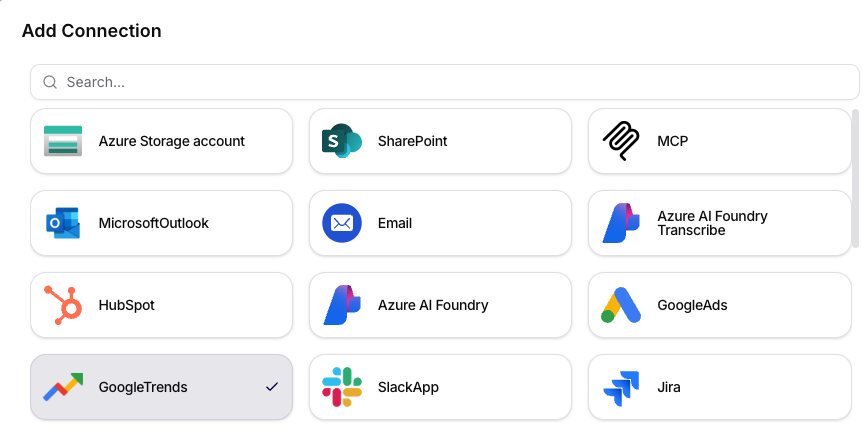
1. The user opens the Add Connection dialog and selects GoogleTrends
- In the administration, navigate to the Connections / Connected Apps section.
- Click on Add Connection.
- In the list of connectors, select the GoogleTrends tile.
2. The user fills in the connector details
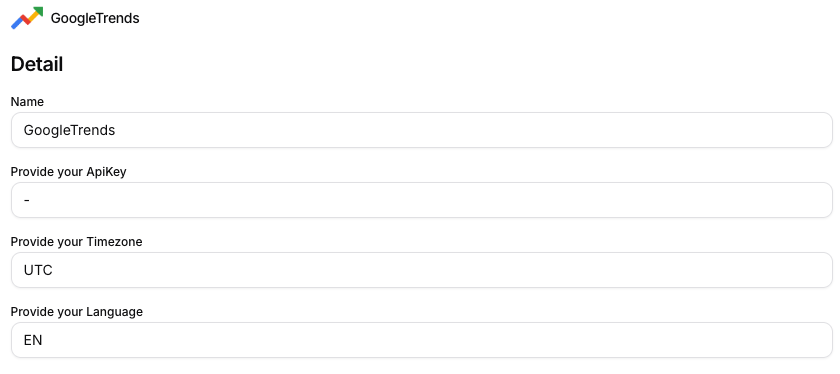
In the Detail form, the user fills in:
- Name: internal name of the connection (e.g.,
GoogleTrends). - Provide your ApiKey: API key, not required in this deployment.
- Provide your Timezone: timezone (e.g.,
UTC). - Provide your Language: response language (e.g.,
EN, CS).
3. The user sets permissions for individual functions
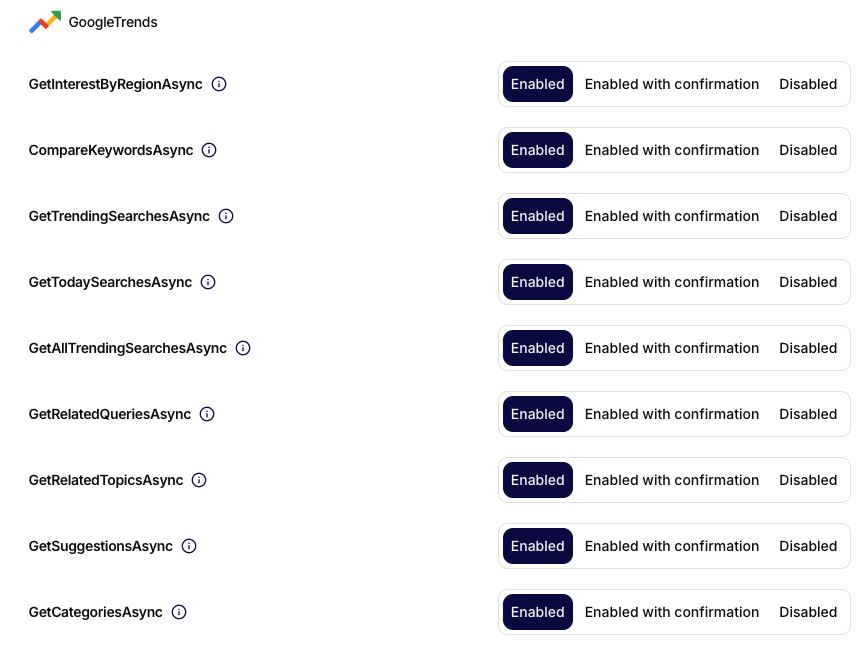
After creating the connection, the user sets the call mode for each operation:
- Enabled,
- Enabled with confirmation,
- Disabled.
Recommendation: set operations that may affect the execution of automations to at least Enabled with confirmation.
4. The user saves and uses the connector
After saving, the connector is available for agents and workflow steps, where specific Google Trends functions can be called according to the set permissions.
Connector configuration parameters
| Parameter | Required | Description |
|---|---|---|
Name | Yes | Internal name of the connector in Siesta AI |
ApiKey | Depending on deployment | API key for accessing the service |
Timezone | Yes | Timezone for queries (e.g., UTC) |
Language | Yes | Language of results (e.g., EN, en-US) |
Supported functions
1. GetInterestOverTimeAsync
Returns the development of interest in one or more keywords over time.
| Parameter | Type | Required | Description |
|---|---|---|---|
keywords | string | Yes | List of 1-5 keywords separated by commas |
timeRange | string | No | Time period for analysis |
geo | string | No | Geographical area (ISO country code) |
category | int | No | Google Trends category |
Default values:
timeRange:LastThreeMonthsgeo: globally (empty value)category:0(all categories)
2. GetInterestByRegionAsync
Returns the distribution of interest in a given keyword by regions.
| Parameter | Type | Required | Description |
|---|---|---|---|
keyword | string | Yes | One keyword |
timeRange | string | No | Time period |
resolution | string | No | Level of geographical resolution |
geo | string | No | Country code |
Default values:
resolution:COUNTRYgeo:US
3. CompareKeywordsAsync
Compares the popularity of multiple keywords over time.
| Parameter | Type | Required | Description |
|---|---|---|---|
keywords | string | Yes | List of 2-5 keywords separated by commas |
timeRange | string | No | Time period |
geo | string | No | Country code |
4. GetTrendingSearchesAsync
Returns currently trending searches.
| Parameter | Type | Required | Description |
|---|---|---|---|
country | string | No | Country name |
Default value:
country:united_states
Behavior:
- Primary attempt through Google Trends API.
- On failure, fallback to RSS feed.
5. GetTodaySearchesAsync
Returns searches trending today.
| Parameter | Type | Required | Description |
|---|---|---|---|
country | string | No | Country code |
Default value:
country:US
Behavior:
- Primarily API, on failure fallback to RSS feed.
6. GetAllTrendingSearchesAsync
Returns globally trending searches across multiple countries.
| Parameter | Type | Required | Description |
|---|---|---|---|
| - | - | - | Function does not require parameters |
Behavior:
- attempt to obtain data via API,
- fallback to multi-country RSS feed.
7. GetRelatedQueriesAsync
Returns queries related to a given keyword.
| Parameter | Type | Required | Description |
|---|---|---|---|
keyword | string | Yes | Keyword |
timeRange | string | No | Time period |
geo | string | No | Country code |
Output includes:
Top queries(most common related queries),Rising queries(rapidly growing queries).
8. GetRelatedTopicsAsync
Returns topics related to a given keyword.
| Parameter | Type | Required | Description |
|---|---|---|---|
keyword | string | Yes | Keyword |
timeRange | string | No | Time period |
geo | string | No | Country code |
Output includes:
Top topics,Rising topics.
9. GetSuggestionsAsync
Returns search suggestions (autocomplete) for the given keyword.
| Parameter | Type | Required | Description |
|---|---|---|---|
keyword | string | Yes | Partial or full keyword |
10. GetCategoriesAsync
Returns the complete list of Google Trends categories.
| Parameter | Type | Required | Description |
|---|---|---|---|
| - | - | - | Function does not require parameters |
Supported values for timeRange
timeRange is case-insensitive and supports the following values:
| Value | Description |
|---|---|
LastHour | last hour |
LastFourHours | last 4 hours |
LastDay | last 24 hours |
LastWeek | last 7 days |
LastMonth | last 30 days |
LastThreeMonths | last 90 days |
LastYear | last 12 months |
LastFiveYears | last 5 years |
FromStart | all available historical data |
If the value is invalid or missing, the default value LastThreeMonths will be used.
Invocation Context
The behavior of the connector can be influenced by the invocation context:
| Field | Default value | Description |
|---|---|---|
Language | en-US | Language of results |
Timezone | 300 | Timezone offset in minutes |
Example:
Language: en-US
Timezone: 300
Data Source Strategy
For endpoints working with trending searches, data retrieval occurs in two steps:
- Attempt to obtain data from the Google Trends API.
- If the API does not respond or returns incomplete data, the system automatically uses the Google Trends RSS feed.
This mechanism ensures higher data availability.
Limits
| Limitation | Value |
|---|---|
| Number of keywords in a query | 1-5 |
| Comparison of keywords | 2-5 |
| Default time period | LastThreeMonths |
Summary
The Google Trends connector is suitable for analytical use cases, topic monitoring, marketing workflows, and comparing trends over time. It provides a unified interface for working with Google Trends data, including a fallback strategy for trending searches.