 MCP
MCP
The MCP connection lets you connect any Model Context Protocol (MCP) server to Siesta AI. An MCP server exposes a set of tools (functions) over a standard protocol, and Siesta AI can call those tools from agents and workflows without a dedicated native connection.
Use MCP when a system already ships an MCP server, or when you want to expose your own tools to agents through a single standard interface. For plain HTTP endpoints without MCP, use the Rest API connection instead.
This page connects a third-party MCP server into Siesta AI so agents and workflows can call its tools. To connect an external AI client to Siesta AI as the MCP server, follow the Siesta AI MCP client setup, including its OAuth option.
Overview
Through an MCP connection, Siesta AI:
- discovers the tools published by the MCP server,
- calls those tools with arguments provided by the agent,
- returns the results into the conversation or workflow.
Requirements
- A reachable MCP server endpoint (URL).
- Any authentication the server requires (for example an API key or bearer token).
- Knowledge of which tools the server exposes and their write behavior.
Choose an Authentication Mode
The MCP connection form offers three authentication modes. Choose the mode from the server's published requirements; do not try several credential types against an unknown endpoint.
| Mode | Use when | Required input | Security guidance |
|---|---|---|---|
| None | The server is intentionally public and accepts unauthenticated MCP requests | Server URL | Verify that the server does not expose private data or write operations without its own controls. |
| Custom headers | The server expects an API key, bearer token, gateway header, or another static header | Server URL and one or more header name/value pairs | Use the narrowest credential available. Never put the value in the connection name, URL, screenshot, prompt, or public documentation. |
| OAuth | The server advertises OAuth through MCP protected-resource and authorization-server metadata | Server URL; client ID only when discovery cannot provide or register one; client secret only for a confidential client | Complete authorization in the browser, verify the provider and requested scope, and keep callback values and tokens private. |
OAuth discovery and authorization
When OAuth is selected, Siesta AI discovers the protected-resource metadata for the MCP endpoint and then the associated authorization-server metadata. Discovery identifies the authorization and token endpoints, requested scope, provider, and whether the server supports dynamic client registration or requires a client ID.
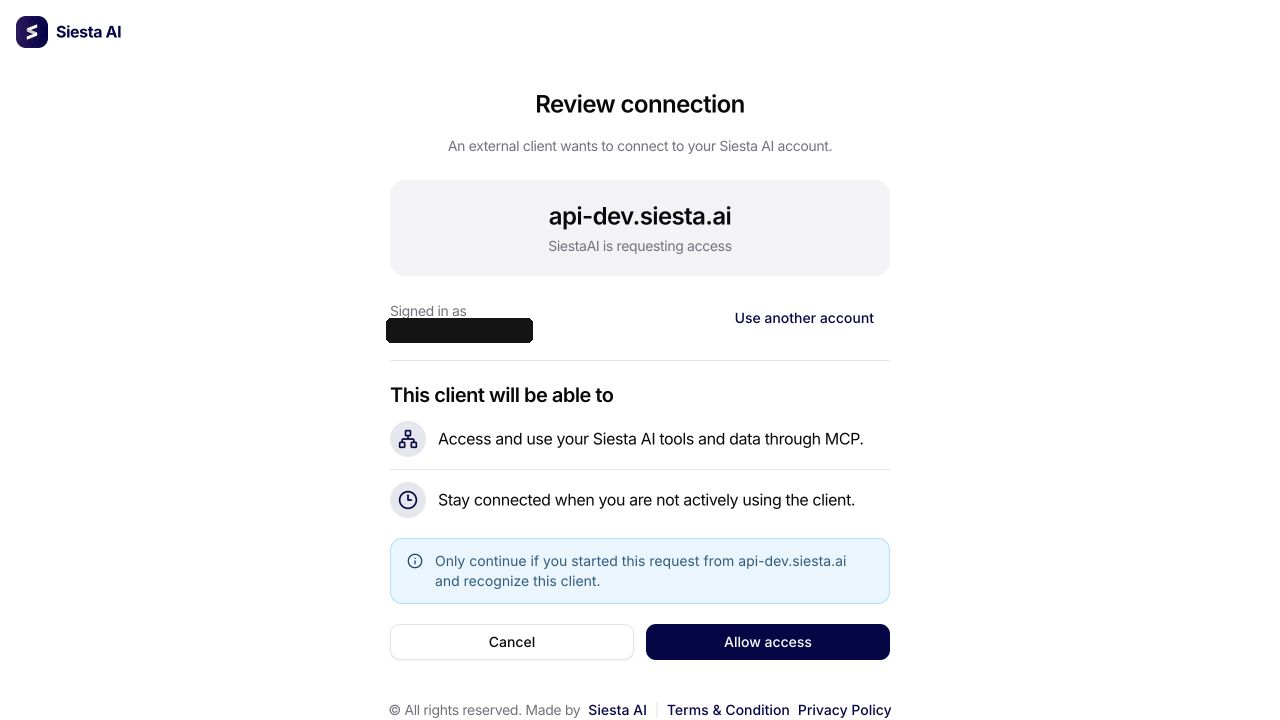
The browser flow uses the OAuth authorization-code grant with PKCE. A protected state value binds the callback to the connection attempt and its code verifier. Do not copy a state value, authorization code, verifier, or callback URL into the connection form or send it to another person.
Client handling depends on the discovered server:
- A dynamically registered or manually supplied public client uses PKCE without a client secret.
- A confidential client uses its client ID and the client secret issued by the authorization server.
- A server can also identify a client through supported client metadata. If discovery reports that a client ID is required, the form asks for it; the client secret remains optional because public clients must not invent one.
After consent, Siesta AI stores the refresh credential in its protected credential store and obtains short-lived access tokens for MCP calls. The displayed provider and scope describe the current authorization. On an existing OAuth connection, select Authorize again on save, confirm that the control changes to Authorization will be renewed on save, and save the connection. This repeats discovery and consent and replaces the stored credential without changing the connection identity.
Reauthorization must be completed by the connection owner. It repairs an invalid OAuth grant, not an unreachable server, missing provider permission, or broken tool. After consent, reload the tools and run a safe read test as described in Check Connection Health and Reauthorize.
If OAuth discovery reports that authorization is not required, use None instead. If OAuth is supported but a client ID is required, supply the registration issued for this MCP server. For a cancelled, invalid, expired, or interrupted callback, return to the connection form and start authorization again; never reuse the callback URL.
In OAuth mode, Additional headers are sent alongside the OAuth bearer token when the server needs a non-authentication routing or gateway header. They do not replace the OAuth token. Do not add a second Authorization credential or copy a bearer token into this section.
1. Add the Connection in Siesta AI
- Open the Connections section.
- Click Add Connection.
- Search for and select MCP.
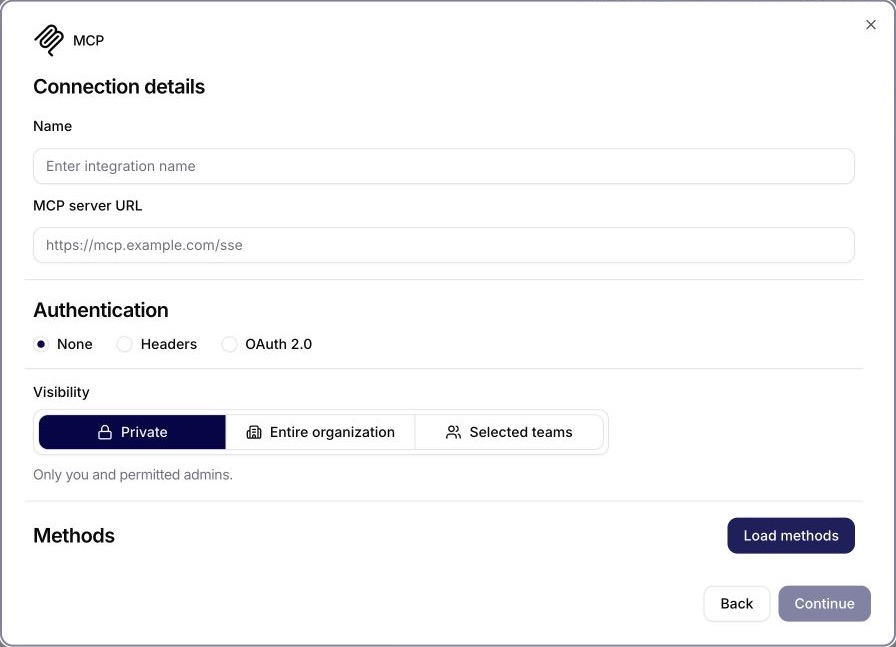
- Fill in:
- Name: a recognizable label for the server.
- Server URL: the endpoint of the MCP server.
- Authentication: choose None, Custom headers, or OAuth using the table above.
- Access:
Private(visible only to you) orShared(usable across the organization).
- Save. Siesta AI connects to the server and loads the available tools.
2. Review and Govern Tools
After connecting, review the tools the server exposes:
- Confirm what each tool does and whether it reads or writes.
- Put write-capable tools into confirmation mode where supported.
- Assign the connection only to agents and workflows that need it.
MCP annotations such as read-only, idempotent, destructive, and open-world are declarations supplied by the server. They help classify a tool but do not enforce provider permissions or prove its behavior. Compare the annotation with the description and schema, test it with safe data, and use the MCP governance matrix when selecting a function access mode. Treat an unknown, missing, or contradictory annotation as write-capable until it is verified.
3. Use MCP Tools
- Open an Agent or Workflow.
- Attach the MCP connection.
- The agent can now call the server's tools during interactions or automatically in the background.
Security & Governance
- Treat MCP tool schemas, headers, and write behavior as production contracts.
- Prefer
Privateaccess for servers with sensitive scope, and review shared access. - Function governance uses the strictest effective setting: enabled, enabled with confirmation, or disabled.
- Tool executions record function status and approval state for audit.
Technical Notes
- Implementation: MCP tools are defined by the connected server rather than a fixed connection module.
- Authentication/scopes: depends on the MCP server (API key, bearer token, or other headers). Limit credentials to what the tools actually need.
- Functions: each tool published by the server maps to a callable function with its own parameters and write behavior.
- Write behavior: tools that change external systems should require confirmation and narrow allowlists for production agents.
Summary
The MCP connection brings any Model Context Protocol server into Siesta AI as a set of callable tools for agents and workflows. It is the standard way to expose custom or third-party tools through one interface, with the same access, confirmation, and audit controls as other connections.