 GitHub
The GitHub connection lets agents inspect repositories, prepare branches, open pull requests, and track GitHub work safely. It uses a configured API token against the GitHub REST API.
When to Use It
Use it when an agent needs to read repository content, triage issues, create implementation branches, update files, open pull requests, inspect workflow runs, or manage repository Actions secrets. It is best for engineering agents that have a clear repository scope, naming convention, and review path.
Setup
- Create a fine-grained GitHub personal access token that can access only the repositories and operations the agent should use. Keep separate tokens for read-only work and write-capable automation.
- In Connections, click Add Integration and select GitHub. Paste the PAT into
Provide your ApiKey. For standard GitHub Cloud, keepProvide your Api Base Urlset tohttps://api.github.com; only change it for GitHub Enterprise with a different REST API base URL. - Limit who can use write functions. Read functions can be broadly useful, but file updates, branch creation, pull request creation, comments, issues, and secret updates should require explicit approval for production repositories.
- Attach the connection to selected engineering agents or workflows with a clear repository scope and review path.
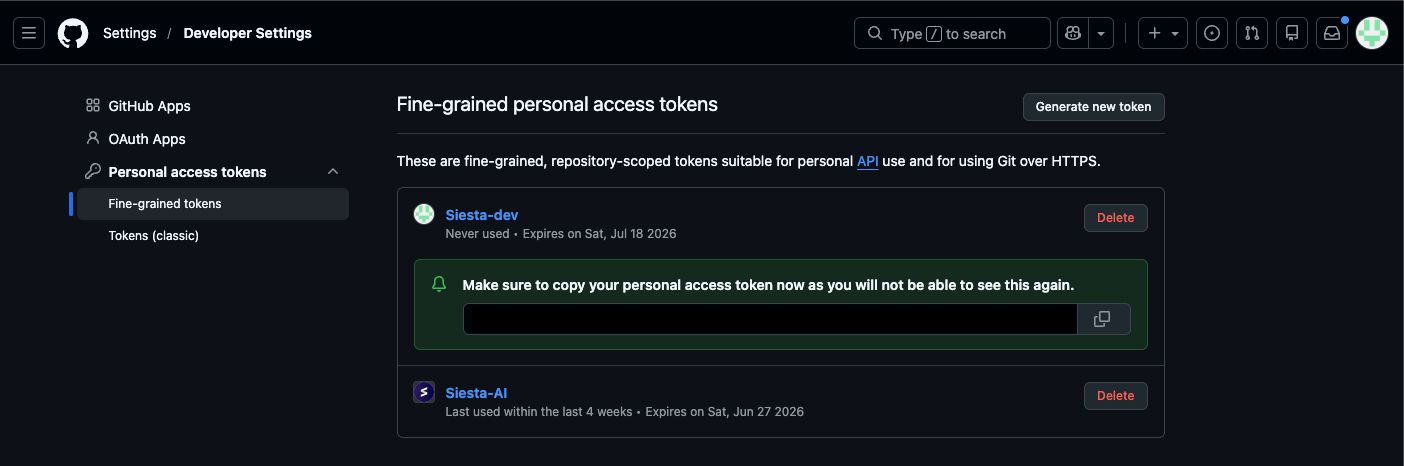
Use a fine-grained PAT that matches the repository scope and write surface you actually want to expose. After GitHub shows the token once, copy it immediately and store it only in Siesta.
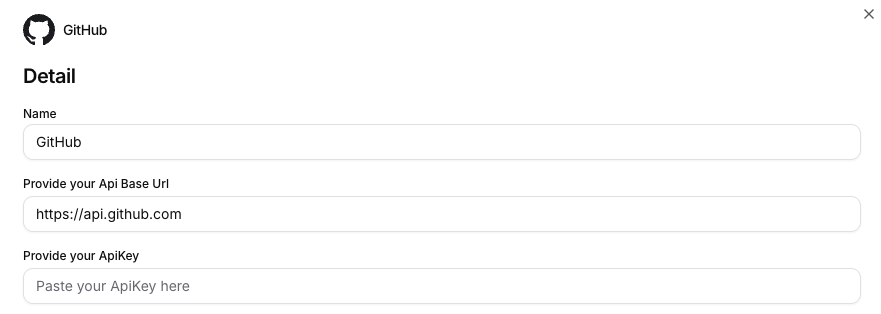
In the connection form, enter the token into Provide your ApiKey. For GitHub Cloud, the Provide your Api Base Url value should stay https://api.github.com.
What the Tool Can Do
- Inspect repository state. Get the current GitHub user, list accessible repositories, load repository metadata, list branches, and browse files or folders.
- Read and change files. Read text files from a branch, create a working branch, then create or update text files with a commit message.
- Manage issues and pull requests. List and open issues, comment on issues or PRs, create pull requests, find an existing PR, and inspect changed files or commits.
- Review delivery signals. List workflow runs, get one workflow run, list repository Actions secret metadata, and create or update an Actions secret value.
Full function surface
| Area | Available functions |
|---|---|
| Identity and discovery | Get current GitHub user, list repositories, get repository metadata |
| Repository content | List branches, create or ensure a branch, read text files, list files and folders, create or update text files, delete files |
| Pull requests | List PRs, get PR details, create a PR, find an open PR by source and target branch, list PR files, list PR commits |
| Issues | List issues, get an issue, create an issue, comment on an issue or pull request |
| Actions and secrets | List workflow runs, get a workflow run, list repository secret metadata, create or update a repository secret, delete a repository secret |
Security and Confirmation
The GitHub implementation blocks direct writes to protected branch names such as main, master, and release/*. The safest pattern is still to make the agent work on a dedicated branch and ask for review before merging.
Before you enable writes, confirm that:
- The token has the smallest repository scope that still supports the use case.
- Write-capable functions require confirmation or are limited to trusted engineering agents.
- The agent prompt names the allowed owner, repository, branch pattern, and file paths.
- Direct commits to production branches are not part of the workflow.
- Secret updates are treated as high-risk and reviewed by an admin or repository owner.
- Tool Runs and GitHub audit history are reviewed after automated changes.
Example Usage
Use the GitHub connection for acme/portal only.
Read the issue, inspect the relevant files, create branch ai/fix-login-copy
from main, update only docs/login.md, and open a pull request.
Do not commit directly to main. Summarize the diff before creating the PR.
Other common use cases:
- Triage bugs into issues. Convert a conversation or task into a GitHub issue with labels, assignees, and a reproducible description.
- Prepare documentation changes. Read current docs, update one or more text files on a feature branch, and open a pull request for review.
- Summarize pull requests. List changed files and commits, then produce a review brief or release-note draft.
- Check failed deployments. Inspect recent workflow runs by branch or status and link the relevant GitHub Actions run to the task owner.
Technical Notes
| Area | Detail |
|---|---|
| Tool name | GitHub |
| Authentication | API key credential sent as Authorization: Bearer <token> |
| Default API host | https://api.github.com |
| Enterprise support | Set the connection field ApiBaseUrl to your GitHub Enterprise REST API base URL. |
| API version header | The tool sends X-GitHub-Api-Version: 2026-03-10. |
| Secret handling | Repository secret values are encrypted before upload and are never returned by GitHub. |
| Connection fields | Use Provide your ApiKey for the PAT and keep Provide your Api Base Url on https://api.github.com unless your GitHub environment uses a different host. |
Common Problems
| Symptom | Likely cause | Fix |
|---|---|---|
| Agent cannot see a repository | The token cannot access the owner or repository | Recreate or update the token with the correct repository access. |
| Branch or file write fails | The target branch is protected, missing, or the token lacks contents permission | Create a working branch from the base branch and check token scopes. |
| Pull request creation fails | Source branch does not exist or target branch is wrong | Ensure the branch first, then create the PR against the intended base. |
| Workflow runs are missing | Token lacks Actions access or the branch/status filter is too narrow | Check token permissions and remove filters while debugging. |
| Secret update fails | Token lacks secret administration permission or the repo public key request failed | Use a repository owner/admin token and retry the update. |