Azure AI Foundry Model Router
Azure AI Foundry model router is a Foundry model deployment that selects an underlying large language model for each request. In Siesta AI, use it like any other Azure AI Foundry deployment name: configure the Azure AI Foundry connection, choose the router deployment for an agent, template, or workflow, and govern usage through Siesta AI access, analytics, and token limits.
This is useful when the workload is mixed. Simple prompts can run on faster and cheaper models, while complex reasoning, tool orchestration, or synthesis can be routed to stronger models without asking users to choose a model for every prompt.
When To Use Model Router
Use model router when:
- agents handle both simple and complex requests,
- customer support or internal helpdesk traffic has many short questions and occasional hard cases,
- workflows include classification, summarization, RAG, or tool-calling steps,
- admins want one deployment name instead of many per-agent model choices,
- cost optimization matters, but quality must stay reliable for harder prompts.
Use a direct model deployment instead when a workflow must always use exactly one approved model, needs model-specific parameters on every request, or has a strict compliance decision that cannot allow dynamic model selection.
Deployment Setup
- In Azure AI Foundry, deploy the
model-routermodel. - Choose the deployment type based on data residency and throughput requirements.
- Start with Balanced routing mode unless the workload is clearly cost-sensitive or quality-critical.
- Optionally enable Route to a subset of models to limit the model pool.
- In Siesta AI, select Azure AI Foundry as the model provider and use the router deployment name, for example
model-router.
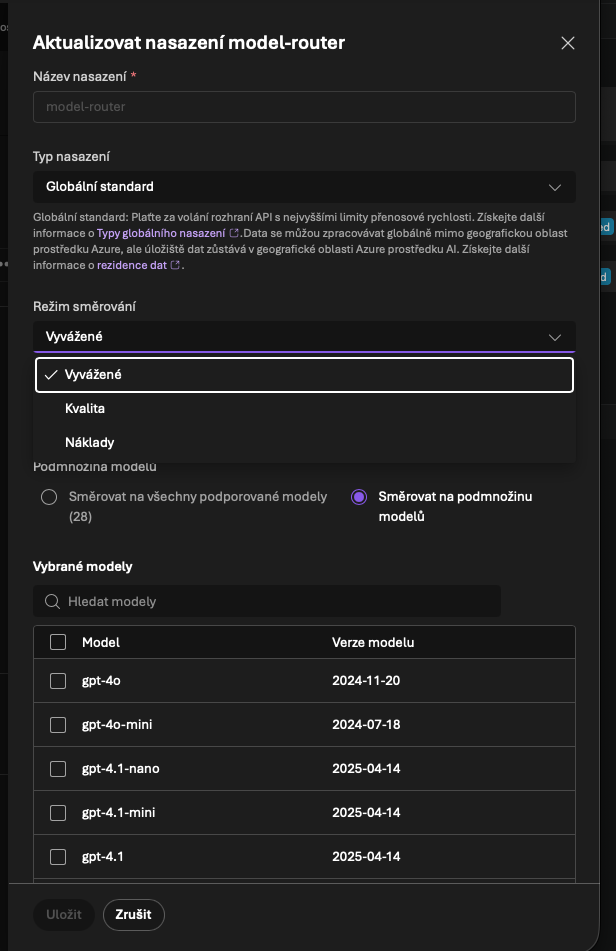
You do not need to deploy every supported underlying model separately for standard router usage. Microsoft documents Claude as a special case: Claude models must be deployed before they can be included in a router subset. Always check the current Microsoft supported-model list before finalizing a production subset.
Routing Modes
| Mode | Use when | Operating guidance |
|---|---|---|
| Balanced | Most production agents and mixed workloads | Default starting point. Observe traffic before changing it. |
| Quality | Critical outputs, complex reasoning, legal or high-risk review, difficult RAG synthesis | Expect higher cost. Use for agents where answer quality matters more than savings. |
| Cost | High-volume classification, triage, simple Q&A, drafts, or batch-like work | Use only where a small quality tradeoff is acceptable. Monitor negative feedback. |
Changes to routing mode or model subset can take a few minutes to take effect in Azure AI Foundry.
Model Subsets
A model subset is the safest way to make router behavior match customer policy. Treat it as a compliance and operating boundary:
- include only models approved by the customer or security team,
- keep at least two models in the subset so failover and routing still have value,
- exclude preview or partner models unless the customer explicitly accepts them,
- raise the context-window floor by selecting only models that can handle the expected prompt size,
- review the subset when Microsoft adds new supported models.
New models should not be assumed approved just because the router supports them. Add them intentionally after security, quality, and cost review.
Recommended Profiles
For enterprise customers, create separate router deployments instead of one deployment with unclear purpose:
| Deployment | Routing mode | Typical subset | Use case |
|---|---|---|---|
router-balanced | Balanced | Approved general-purpose and reasoning models | Default agents, internal assistants, mixed chat |
router-quality | Quality | Stronger reasoning and synthesis models | Legal, finance, executive, or complex RAG work |
router-cost | Cost | Smaller approved models | Triage, classification, simple Q&A, high-volume workflows |
In Siesta AI, assign the profile that matches the agent or workflow. This keeps the user experience simple while preserving admin control.
Data Residency
The deployment type matters more than the router name:
- Global Standard can process inference traffic in any Azure region where the selected model is available. Use it when the customer accepts global processing and wants broad availability and higher default quota.
- Data Zone Standard processes prompts and responses only inside the Microsoft-defined data zone, such as the EU or US data zone. Use it when the customer needs zone-level residency.
- Regional Standard processes in the deployment region where supported. Use it for stricter regional requirements, with the tradeoff that model availability and quotas can be narrower.
Data stored at rest remains in the customer's designated Azure geography according to Microsoft Foundry data-residency commitments. Prompts and completions for Models sold by Azure are not available to OpenAI or other model providers and are not used to train foundation models without the customer's permission or instruction.
For EU customers that ask whether data can go to the United States, do not answer from the router mode alone. Check the Azure deployment type. If the deployment is Global Standard, inference processing can happen globally. If that is not acceptable, use an EU Data Zone deployment where the required router and model subset are supported.
Observability
Use three layers of evidence:
- Azure AI Foundry playground: test prompts and inspect which underlying model was selected.
- API response: the
modelfield identifies the underlying model that handled the request. - Azure Monitor and Azure Cost Management: filter by the model router deployment and split metrics by underlying model where available.
In Siesta AI, use Analytics Cost charts and token limits to track model-connection usage by agent, model connection, team, and user. For underlying router distribution, use Azure Monitor as the source of truth.
Customer Care Guidance
When recommending model router to customers, frame it as a model strategy:
- users should choose the right agent, not the model for every prompt,
- admins should approve a model subset once and let routing handle per-request selection,
- start in Balanced mode, observe traffic, then split critical or high-volume workloads into Quality or Cost router deployments,
- combine router usage with Siesta AI token limits, feedback review, and agent analytics,
- document the deployment type so data residency questions have a clear answer.
Avoid promising fixed savings. Savings depend on the workload mix, prompt length, tool usage, selected subset, and current Azure pricing.
FAQ
What does the router use to decide?
Microsoft documents that model router analyzes the request in real time, including system message, user message, conversation history, tool definitions, task type, complexity, and routing mode. It then selects an eligible underlying model from the configured pool.
Do all supported models need to be deployed?
No. For standard router usage, Microsoft packages router as one deployment and invokes supported underlying models. Claude models are the documented exception and must be deployed before they can be included in routing.
Can admins see which model was used?
Yes. The Foundry playground and API response expose the selected underlying model. Azure Monitor can be used to inspect routing distribution and performance by deployment and underlying model.
What if the selected model is unexpected?
Review the routing mode and model subset. If the customer does not approve a model, remove it from the subset or enforce approved models through Azure Policy. If a workload needs one exact model, use a direct deployment instead of model router.
How should token limits be configured?
Set Siesta AI token limits on the model connection that points to the router deployment. Treat the router as one shared model connection for budget enforcement, then use Azure Cost Management for deeper underlying-model cost analysis.
What can cause high latency?
Latency can come from router overhead, the selected underlying model, long prompts, tool calls, RAG retrieval, or regional capacity. For simple high-volume workloads, test Cost mode. For predictable high-throughput requirements, review provisioned deployment options in Azure.
What can cause quota errors?
Router deployments still use Azure quota and rate limits. If requests are throttled, increase quota, reduce concurrency, retry with backoff, or split traffic across reviewed deployments where the Azure architecture allows it.
Useful Links
- Microsoft model router guide: Use model router for Microsoft Foundry
- Microsoft concept guide: Model router for Microsoft Foundry
- Microsoft routing details: How model router works
- Microsoft deployment types: Deployment types for Microsoft Foundry Models
- Microsoft data privacy: Data, privacy, and security for Models sold by Azure