Connectors
The Connectors section is used to work with external systems. Connectors link Siesta AI with third-party tools (APIs, SaaS platforms, internal systems) so that assistants and workflows can read data, write changes, or trigger actions.
How it works
- Management: In the Connectors section, you activate a specific connector, set access (OAuth / API key), and assign it to assistants or workflows.
- Usage: Connector actions are called from prompts, tools, or automations (e.g., send an email, fetch data from CRM).
- Security: Access tokens are stored in encrypted form, and all operations are fully audited.
Connectors Screen Overview
- A search field at the top for quick filtering of connectors.
- A table with columns: Name, Type, Created, Access + actions on the right (menu ...).
- A Add Connector button to create a new connector.
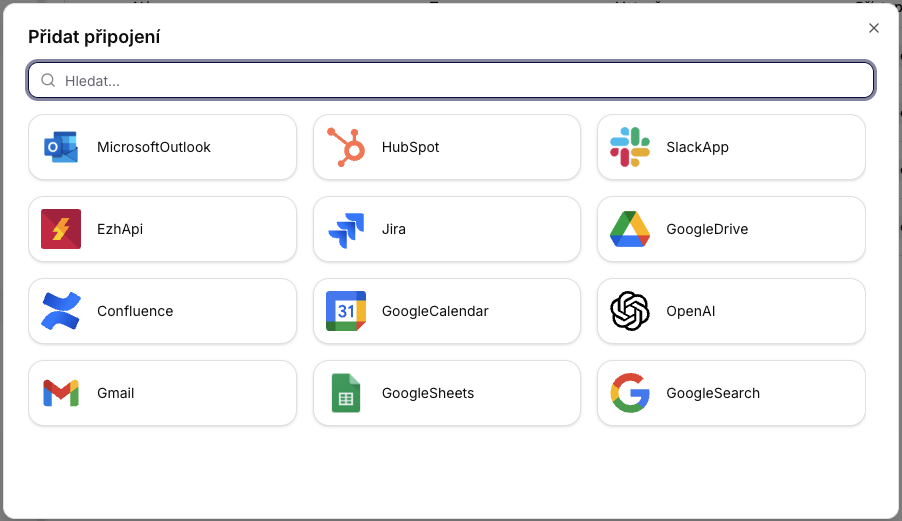
- Examples of available connectors: Jira, Google Search, HubSpot, OpenAI.

Connectors Overview
The connectors overview provides a centralized place for managing all integrations used by assistants and workflows.
Adding a New Connector
After clicking on Add Connector, a dialog will open with a search field and a list of available connectors (e.g., Gmail, Google Calendar, Google Drive, Slack App, OpenAI).