Security
The Security section provides an overview of the organization's security status within the Siesta AI platform.
It serves to identify risky configurations and recommends steps that enhance the security of the environment.
The Security page includes:
- A list of security recommendations
- The category of each recommendation
- Severity level
- Information on whether the configuration complies with the recommendation
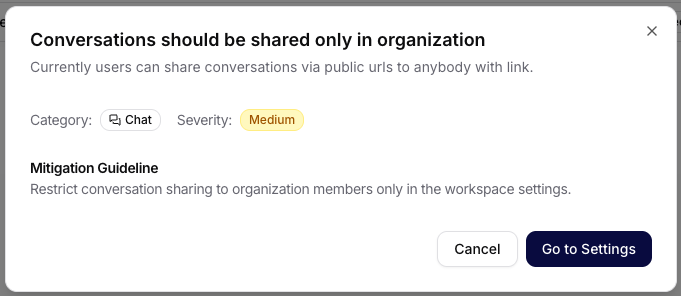
- Recommended remediation steps
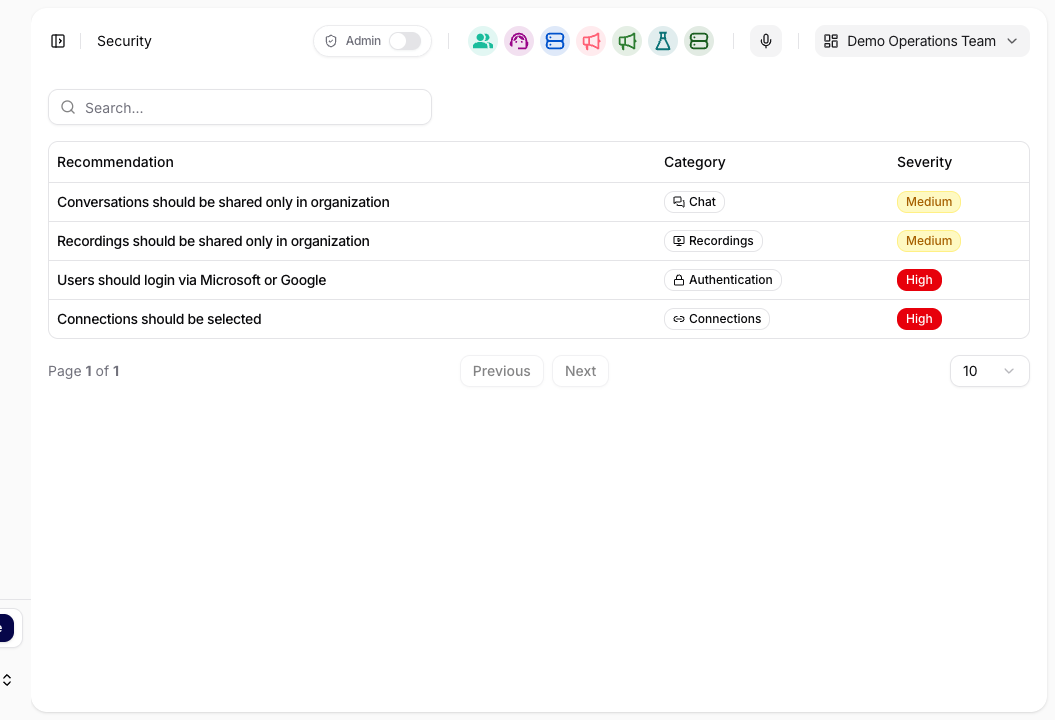
Security checks focus on the following areas:
1. Content Sharing
- Checking conversation sharing
- Checking record sharing
- Limiting public access to data
The goal is to prevent unintentional leaks of internal information.
2. Authentication
- Verification of user login methods
- Recommendation to use federated login (Microsoft / Google)
- Limiting weak or local access mechanisms
The goal is to minimize the risk of account compromise.
3. AI Limits and Resource Management
- Checking rate limit settings
- Checking usage quotas
The goal is to prevent system abuse and uncontrolled cost growth.
4. External Connections
- Overview of active integrations
- Checking permissions of connected systems
The goal is to ensure that only necessary and approved integrations are allowed.
Each recommendation is marked with a severity level:
- Medium – recommended improvement
- High – significant security risk
It is recommended to address items with higher severity as a priority.
Recommended Procedure
- Regularly check the Security section.
- Address high severity items without delay.
- Limit public data sharing.
- Utilize federated login.
- Actively manage connections and access permissions.
The Security section helps the organization maintain a secure, controlled, and auditable environment when working with AI and corporate data.
Design and Operations Guidance
The Security page reports product findings. Use the Security and Governance section when you need to design or review the wider operating controls around:
- AI-specific threats and prompt injection,
- data access and RAG,
- tool governance and human approval,
- auditability and incident response,
- model governance, data residency, and production readiness.